

9 Best Nintendo Switch Controllers: 2025 Buyer’s Guide

Eneba Hub contains affiliate links, which means we may earn a small commission if you make a purchase through them—at no extra cost to you. Learn more

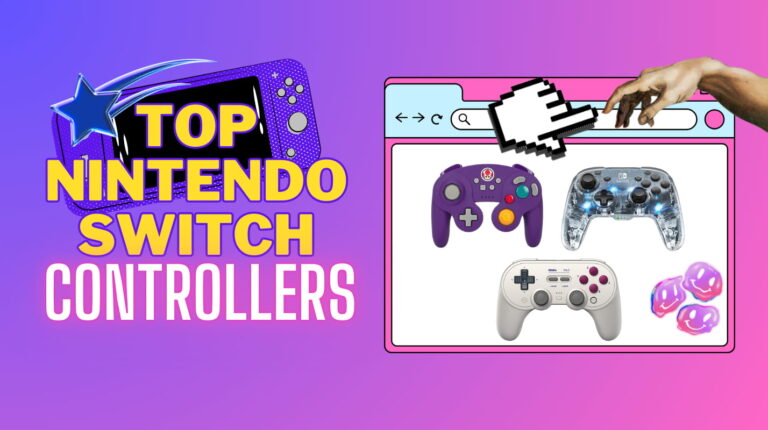
The search for the best Switch controller just got easier. And it’s time for a change. Picture this: It’s 2 AM, your eyes are heavy, but you’re on the cusp of victory in Super Smash Bros. Ultimate. Suddenly, your controller disconnects. You final smash your controller against the wall. We’ve all been there. Betrayed by subpar gear at the worst possible time.
In this guide, you’ll find a myriad of options. Want classic designs? There’s something here for you. Tend to like flashy lighting? There’s a perfect product for you here, too. Anyway, I’ll be helping you pick out your new controller to finally give your gaming setup the upgrade that it deserves.
I’ve gone on the deep end and researched all products’ responsiveness, durability, performance, and what gamers had to say about them. For my casual gamers seeking comfort to my competitive gamers wanting precision, I’ve got insights here that go beyond specs. Plus, I’ll be including links to great deals if you want to buy a product ASAP.
Our Top Picks for Switch Controllers
Here are my top three picks for the best switch controllers. Each one earned its spot by delivering outstanding performance or by a standout and convenient feature.
- 8Bitdo Pro 2 Controller for Switch – Top-tier versatility with perfect ergonomics and deep customization.
- AceGamer Wireless Controller for Switch – Budget-friendly powerhouse with impressive battery life and motion control support.
- 8Bitdo Arcade Stick – The ultimate weapon for fighting game fans who want an authentic arcade experience.
There are more products below, so keep reading.
Jump to:
9 Best Nintendo Switch Controllers
Below are in-depth reviews of the 9 best Nintendo Switch controllers. I break down build quality, responsiveness, special features, and overall feel for each one. Let’s get to it.
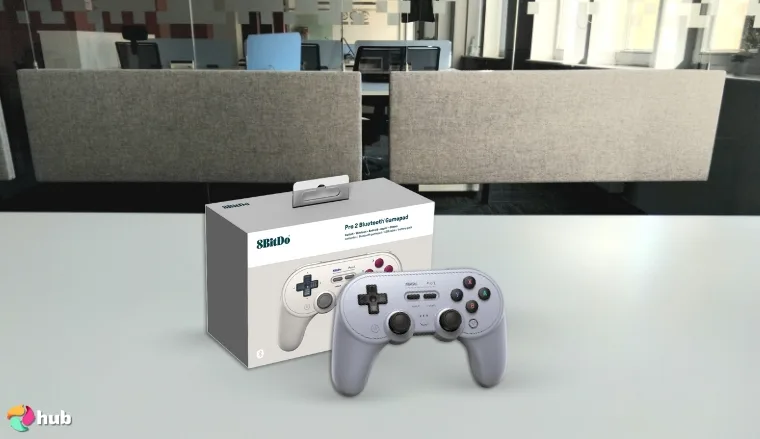
1. 8Bitdo Pro 2 Controller for Switch [BEST OVERALL]
| Connectivity | Wired, Wireless (Bluetooth) |
| Battery Life | Up to 20 hours |
| Motion Controls | Yes |
| HD Rumble | Yes |
| Programmable Buttons | Yes |
| Compatibility | Nintendo Switch, Switch Lite, Switch OLED |
| Additional Features | Turbo function, back paddles, adjustable profiles |
After extensive deep-diving, I’ve concluded that the 8Bitdo Pro 2 Controller is the Swiss-army knife of Nintendo switch controllers. From the moment you sync it to your Nintendo Switch, the pad feels like a refined Switch pro controller, adding deeper options while slotting neatly into handheld mode sessions on the bus. For frustrated Joy-Con Users dreading drift, the Pro 2’s recalibrating sticks consistently reduce drift.
Comfort is instant: the sculpted grips echo classic SNES games, yet breathe better during marathon fighting games where sweaty palms ruin clutch inputs. Ultimate Software unlocks three on-board profiles and lets you remap any input, set programmable buttons, and fine-tune motion controls without touching menus mid-match. One click toggles turbo functionality, perfect for retro shooters or bullet-hell marathons.
When you dock the console for couch play, the controller swaps to USB-C and becomes a low-latency wired controller with roughly six-millisecond response. It’s fast enough for hardcore competitive gamers grinding ranked Smash. Solid battery life hovers near twenty hours, and a four-hour top-up keeps you in the race through every Mario Kart cup. If power dips, you just plug in and keep driving.
The Pro 2 isn’t fitted with true hall effect sensors, yet its recalibration mimics drift-free precision while undercutting premium other controllers on cost. You can play wirelessly across the living room, stash it beside the console inside the Switch’s dock, and still call it the best Nintendo Switch upgrade for value-hunters. Plus, frequent sales highlighted in deal round-ups keep the price tempting.
| Pros | Cons |
|---|---|
| ✅ Drift-reducing calibration ✅ Deep programmable buttons & three profiles ✅ Solid battery life plus USB-C fast charging ✅ Works docked, tabletop, and handheld play ✅ Comfortable grips for long fighting games | ❌ Lacks Amiibo NFC scanner |
Final Verdict: The 8Bitdo Pro 2 is the ultimate controller for versatility and speed. This controller will accompany you in competitive play or relaxed handheld play with ease.
An alternative is the PDP Gaming Afterglow Switch Pro Controller. It also offers deep customization with added RGB flair for gamers who like personalization.
2. AceGamer Wireless Controller for Switch [BEST BUDGET]
| Connectivity | Wired, Wireless (Bluetooth) |
| Battery Life | Up to 12 hours |
| Motion Controls | Yes |
| HD Rumble | Yes |
| Programmable Buttons | Yes |
| Compatibility | Nintendo Switch, Switch Lite, Switch OLED |
| Additional Features | Wake-up, screenshot, turbo, six-axis |
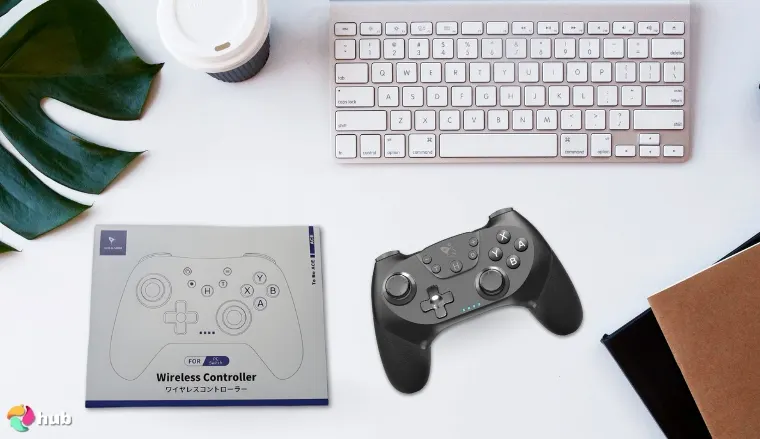
From taking a close look at it, the AceGamer Wireless Controller punches well above its price. For budget-focused gamers, this controller is a clear pick. It’s a solid pad that won’t drain your wallet. The textured shell’s build quality feels sturdier than most bargain controllers. It shrugs off drops and fingerprints effortlessly.
AceGamer adds unique features that erase the real pain cheap buyers fear. Six-axis gyro lets you tilt-aim fireballs in Super Smash Bros, and dual motors keep Street Fighter combos punchy. A 1000 mAh pack runs roughly 12 hours and revives quickly over reversible USB C. Plus, pairing the wireless controller is simple! You tap wake, connect, and dive into TV mode on Switch.
You’ll normally encounter zero connection issues; latency stays tight for online brawls. Stick feel matters, and the textured right stick tracks smoothly through Hyrule with no drift. On-board button mapping and turbo offer farming or shooter speed. It’s truly one of the finest joy con alternatives available online. And there’s more to love when it comes to this product.
You can bounce between handled tabletop sessions and docked play and you won’t lose sync ever. AceGamer proves that budget doesn’t always equal compromise. This controller is the easy pick for gamers who want to play and keep cash for games. Each and every time.
| Pros | Cons |
|---|---|
| ✅ Solid build quality for the price ✅ Precise gyro & rumble extra features ✅ Quick USB C charging ✅ Reliable wireless with no connection issues ✅ On-pad button mapping & turbo | ❌ Battery tops out at 12 h vs premium pads |
Final Verdict: The AceGamer Wireless Controller for Switch delivers impressive performance and features at an affordable price point. It’s THE excellent choice for budget-conscious gamers who want to get a reliable and feature-rich controller.
Need more features? Grab the 8Bitdo Pro 2 as an alternative for deeper profiles and longer life.
3. 8Bitdo Arcade Stick [BEST ARCADE STICK]
| Connectivity | Wired, Bluetooth, 2.4 GHz |
| Battery Life | Up to 40 hours |
| Motion Controls | No |
| HD Rumble | No |
| Programmable Buttons | Yes |
| Compatibility | Nintendo Switch, Switch Lite, Switch OLED, PC |
| Additional Features | Charging dock, macro buttons, 2.4 G dongle bay |
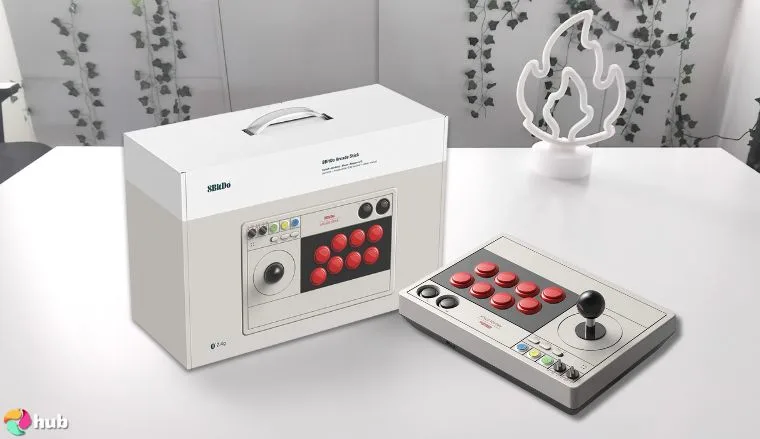
After putting the 8Bitdo Arcade Stick through its paces, I’m convinced it’s the most flexible fight stick you can buy for Switch. Ultimate Software lets you customize controller settings in minutes, saving macros on the P1/P2 keys.Its cabinet look feels authentic yet portable, so shifting it to docked mode is easy.
The stick can switch wirelessly via Bluetooth or 2.4 G; a hidden bay stores the dongle for travel. Lag is imperceptible, and purists can cable USB-C for zero delay. An LED remembers the last play style, so warm-ups stay quick. A Sanwa-inspired left stick lever and 30 mm buttons land clean Dragon Punches, while side remappable buttons handle menus. Fans migrating from a pro controller will appreciate onboard + and – keys.
Battery life reaches 40 hours on its 1 000 mAh cell and tops off on the matching charging dock. Despite wireless guts, build quality rivals full-size fightsticks. A rear switch flips to wireless option off for tournament-legal cable play, and modders can swap parts, even craft a smaller version using standard plates.
Using the mode slider, you can jump from Switch to PC in seconds. Fighters wanting arcade purism without cables now have the bridge between casual fun and competitive polish.
| Pros | Cons |
|---|---|
| ✅ Triple-mode Bluetooth/2.4 G/wired wireless option ✅ Long battery with included charging dock ✅ Deep macros & remappable buttons ✅ Rock-solid build quality ✅ Easy modding, PC compatibility | ❌ No HD rumble or gyro support |
Final Verdict: The 8BitDo Arcade Stick masterfully blends retro aesthetics with modern functionality. It gives you a wireless and customizable gaming experience. It’s a top-tier choice for new players and seasoned fighting game enthusiasts.
Want something similar? The 8Bitdo Pro 2 is a great alternative.
4. Nintendo GameCube Controller [Best Official]
| Connectivity | Wired (USB adapter) |
| Battery Life | N/A (wired) |
| Motion Controls | No |
| HD Rumble | No |
| Programmable Buttons | No |
| Compatibility | Nintendo Switch (dock/TV) |
| Additional Features | Analog triggers, notched left stick |
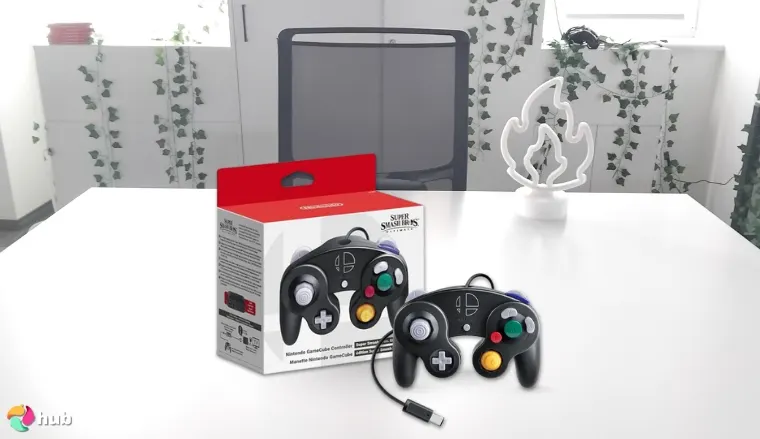
The original Nintendo GameCube controller still delivers the purest Smash and Mario Kart experience on modern Nintendo Switch consoles. While it lacks modern features like motion controls, HD rumble, and a capture button, its compatibility with the Switch via a USB adapter offers a straightforward plug-and-play experience.
For players prioritizing responsiveness and a classic feel, the GameCube controller still delivers. Because it’s fully wired, latency is effectively zero, and worries about mid-set battery life disappear. Hardcore competitors gain frame-perfect confidence, while New Switch Explorers enjoy an uncomplicated setup.
Durability remains legendary. Many originals from 2002 still function after brutal tournament seasons, and Nintendo’s 2024 re-run uses the same membranes and springs, outlasting most other controllers on the market. The cable’s generous length reaches a living-room couch with room to spare, and 4 pads plus Joy-Cons unlock eight-player chaos without Bluetooth interference.
What you give up in gyro, rumble, and capture buttons you gain back in timeless ergonomics: the XL C-stick sweeps cameras smoothly in 3D All-Stars, and the triggers’ analog pull revives F-Zero throttle nuance. For frustrated joy-con users, the tight stick gate eliminates drift concerns. And for budget-focused gamers, official builds still retail under €25. Even in 2025, few inputs feel this satisfyingly snappy.
| Pros | Cons |
|---|---|
| ✅ Zero-lag wired input ✅ Iconic ergonomic shell ✅ Notched left stick for precise angles ✅ Official Nintendo build quality ✅ Affordable even new | ❌ Lacks modern motion/rumble features |
Final Verdict: The Nintendo GameCube Controller is still the definitive wired pad for accuracy and nostalgia.
An alternative is the PowerA GameCube Style Wireless Controller. It keeps the classic GameCube layout but adds motion controls and wireless support.
5. Gammeefy JC200 Switch Controller [Best Handheld]
| Connectivity | Clip-on rail & Bluetooth |
| Battery Life | Up to 10 hours |
| Motion Controls | Yes |
| HD Rumble | Adjustable |
| Programmable Buttons | Yes |
| Compatibility | Switch, OLED |
| Additional Features | RGB, turbo, hall sticks |
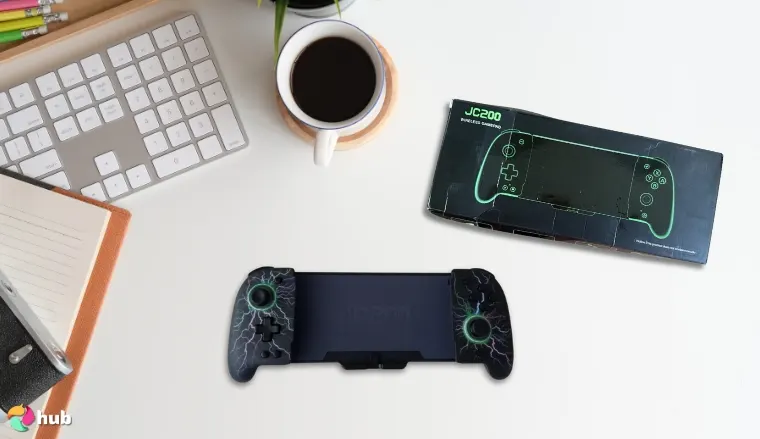
The Gammeefy JC200 turns the console into a true handheld pad, crushing the real pain of cramped Joy-Cons. Hall-effect sensors protect both analogs, and solid build quality spreads weight with rubberised grips. Ten-hour battery life charges alongside the console via single USB C pass-through. This controller stays comfy, convenient, colorful, and 100% ready in your hands.
Gammeefy adds unique features too. It has 17 RGB modes, three-stage rumble, turbo, and rear paddles. And you won’t need to worry about connection issues because the unit locks directly to the rails. Zero-lag aiming feels great in Super Smash Bros, while the textured right stick keeps camera sweeps smooth in open-worlds. Quick button mapping turns repetitive farming into a breeze, and even Street Fighter combos benefit from the responsive microswitch triggers.
Pop the console out and the JC200 becomes a wireless controller. Bluetooth pairs in two seconds, which is perfect for tabletop or TV mode sessions. Vibration strength toggles guarantee you battery savings on flights. These extras push it ahead of pricier third-party controllers and make it a top pick among joy con alternatives.
For travelers building the best nintendo switch accessories kit, this grip is indispensable!. If drift, cramps, or signal drops spoil your gameplay, JC200 fixes them in one clever shell.
| Pros | Cons |
|---|---|
| ✅ Hall sticks eliminate drift ✅ Ergonomic rails ease hand strain ✅ RGB, turbo & paddles = rich extra features ✅ Single-cable USB C charging ✅ Rock-solid rail mount (no connection issues) | ❌ Adds noticeable weight to handheld play |
Final Verdict: The Gammeefy JC200 fuses console-grade control with portable comfort. It’s your go-anywhere upgrade for handheld quests or impromptu couch battles.
A great alternative is the EasySMX X15 Controller. It shares hall effect tech and ergonomic design. Plus it offers Xbox-style versatility for both handheld and docked play.
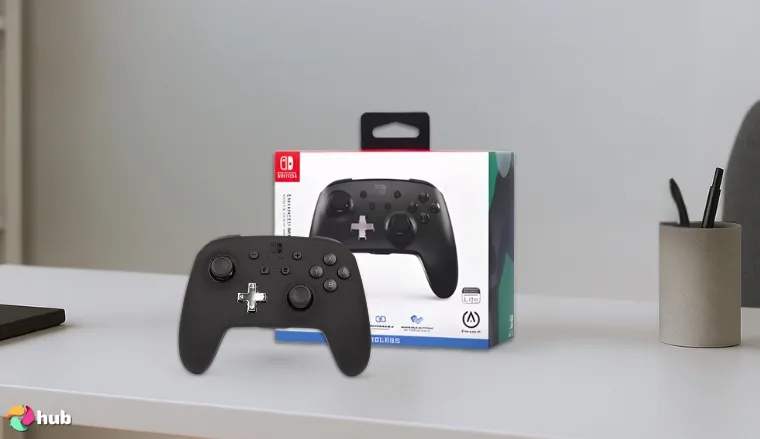
6. PowerA GameCube Style Wireless Controller [Best GameCube Style]
| Connectivity | Bluetooth 5.0 |
| Battery Life | Up to 30 hours (2x AA batteries) |
| Motion Controls | Yes |
| HD Rumble | No |
| Programmable Buttons | No |
| Compatibility | Nintendo Switch, Switch OLED, Switch Lite |
| Additional Features | Octagonal gated analog sticks, larger D-pad, LED indicators, officially licensed by Nintendo |
Remember the thrill of racing through Mario Kart circuits or executing precise combos in your favorite fighting games with the classic GameCube controller? The PowerA GameCube Style Wireless Controller brings that cherished experience to the Nintendo Switch! Enjoy nostalgia with modern functionality.
This controller is a trip down memory lane and more. It’s equipped with motion controls and enhances gameplay in titles like Mario Kart by allowing intuitive steering and movement. The octagonal left stick design helps you succeed with precise directional input. This is a savior especially for racing and fighting games.
Operating on two AA batteries, it offers an impressive battery life of up to 30 hours. You can enjoy extended play sessions without frequent interruptions. While it doesn’t include a charging dock, the extended playtime minimizes the need for constant recharging.
A drawback is that this controller lacks HD rumble and NFC functionality, which may be a consideration for some users. Despite these omissions, the PowerA GameCube Style Wireless Controller offers a comfortable and responsive gaming experience. It’s a worthy addition to any Nintendo Switch setup.
| Pros | Cons |
|---|---|
| ✅ Integrated motion controls ✅ Authentic GameCube design ✅ Extended battery life ✅ Comfortable for extended handheld play ✅ Seamless Bluetooth Connectivity | ❌ No HD rumble or NFC support |
Final Verdict: The PowerA GameCube Style Wireless Controller is a first choice for gamers who want a classic design that comes with modern convenience and functionality. It’s one of the best Nintendo accessories for nostalgic fans.
An alternative? Try the Nintendo GameCube Controller. It’s for players who prefer the authentic wired experience with analog triggers and zero latency over modern extras.
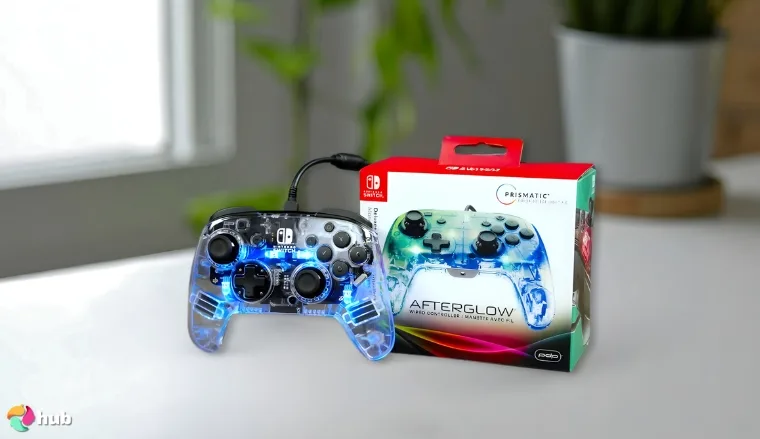
7. PDP Gaming Afterglow Switch Pro Controller [Best Customizable]
| Connectivity | Bluetooth 5.0 (up to 30 ft range) |
| Battery Life | Up to 40 hours (rechargeable via USB-C) |
| Motion Controls | Yes |
| HD Rumble | No |
| Programmable Buttons | Yes (dual back paddles) |
| Compatibility | Nintendo Switch, Switch OLED, Switch Lite |
| Additional Features | RGB lighting (8 zones, 4 modes), transparent housing, officially licensed by Nintendo |
Imagine this: you’re deep into a late-night gaming session, the room dimly lit, and your controller pulses with vibrant RGB lights, mirroring the intensity of your gameplay. The PDP Gaming Afterglow Switch Pro Controller is an extension of your gaming persona, and puts the “game” in gaming.
From the moment you grip it, the controller feels like it was crafted just for you. Its ergonomic design will keep you comfy and the textured grips provide a secure hold. The buttons respond with satisfying precision, and the analog sticks glide smoothly. It gives you complete control over every move. But it’s not all about looks and feel. This controller is packed with features that enhance your gaming experience.
The integrated motion controls bring a new level of immersion to your favorite titles. The dual programmable back buttons can be customized to suit your playstyle. It also gives you a competitive edge in fast-paced games. Battery life’s impressive to say the least. With up to 40 hours on a single charge, you can game for days without worrying about recharging.
| Pros | Cons |
|---|---|
| ✅ Customizable RGB lighting ✅ Long-lasting battery life ✅ Integrated turbo functionality ✅ Remappable buttons for personalized control ✅ Ergonomic Design for Extended Play | ❌ No HD rumble or NFC support |
Final Verdict: The PDP Gaming Afterglow Switch Pro Controller offers a blend of style and functionality. It’s a standout controller among joy con alternatives and is perfect for gamers who love customization features and longer playtime.
A good alternative is the 8Bitdo Pro 2 Controller. It focuses on programmable profiles and deeper button remapping with less flash.
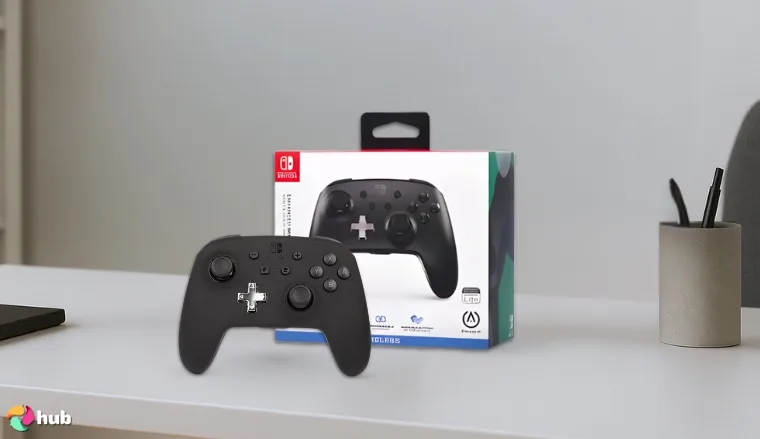
8. PowerA Enhanced Nintendo Switch Controller [Best for TV Mode]
| Connectivity | Wired, Wireless (Bluetooth) |
| Battery Life | Up to 30 hours |
| Motion Controls | Yes |
| HD Rumble | Yes |
| Programmable Buttons | Yes (Advanced Gaming Buttons) |
| Compatibility | Nintendo Switch, Switch Lite, Switch OLED |
| Additional Features | NFC reader, back paddles, ergonomic design |
Designed for gamers who want a more traditional feel when playing on a big screen, this controller immediately feels like an ultimate controller upgrade the moment you pick it up. If you’re like me, there’s nothing better than relaxing on the couch, firing up your Nintendo Switch, and seeing your game come to life on the best gaming TV. That’s where the PowerA Enhanced Nintendo Switch Controller truly shines.
Lightweight, comfortable, and intuitive, this controller solves two major issues for a lot of gamers: hand cramps from Joy-Cons and weak wireless signals. You get all the important features you’d expect: responsive motion controls, a built-in NFC reader for Amiibo scanning, and handy back paddles for on-the-fly remapping.
The extra rear buttons make games like Splatoon 3 and Super Smash Bros. Ultimate feel smoother and more competitive. Even better, the controller pairs effortlessly via Bluetooth without noticeable lag, which makes it perfect for intense online matches or fast-paced racing.
One of the best things about using this controller on a big screen is how immersive the experience becomes. Unlike Joy-Cons, the Enhanced Controller fills your hands like a true gamepad, bridging the gap between handheld sessions and serious gaming. It’s incredibly easy to recommend it for Switch owners who already invested in their setup’s quality.
| Pros | Cons |
|---|---|
| ✅ Smooth wireless connection ✅ Motion controls and NFC reader included ✅ Comfortable ergonomic design ✅ Lightweight but durable build ✅ Programmable back paddles for faster inputs ✅ Long battery life up to 30 hours | ❌ Some models skip rumble features (check variant) |
Final Verdict: The PowerA Enhanced Nintendo Switch Controller levels up TV gaming without emptying your wallet. It’s the ideal choice for Switch players who crave console-quality gameplay from their sofa.
A strong alternative is the EasySMX X15 Controller. It includes back paddles, motion controls, and turbo.
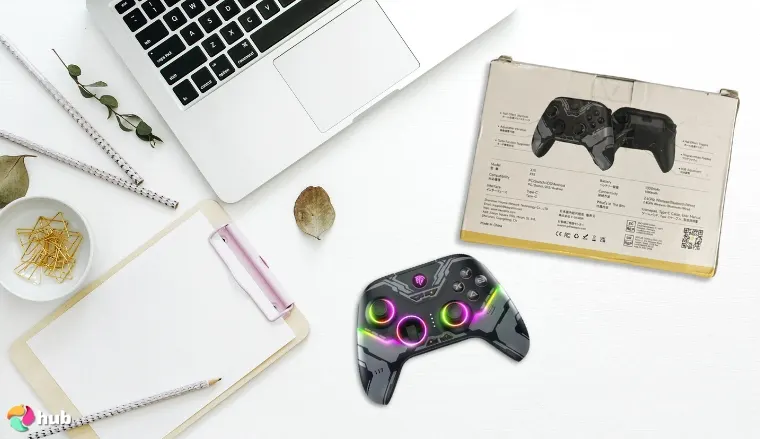
9. EasySMX X15 Controller [Best Xbox-Style]
| Connectivity | Wired, Wireless (Bluetooth) |
| Battery Life | Up to 20 hours |
| Motion Controls | Yes |
| HD Rumble | Yes |
| Programmable Buttons | Yes |
| Compatibility | Nintendo Switch, Switch Lite, Switch OLED, PC, Android |
| Additional Features | Turbo function, real D-pad, ergonomic grips |
If you want the best Xbox controller alternative for Nintendo Switch gaming, the EasySMX X15 Controller is a hidden gem. It offers that familiar, sturdy Xbox-style design while layering in cool features perfect for Nintendo fans. As someone who plays across multiple platforms, finding a controller that balances price, comfort, and versatility is a dream.
Enter the EasySMX X15 Controller. When you pick it up for the first time, you’ll be able to tell this device is serious about comfort. With its classic Xbox-style layout and textured grips, it feels perfect for longer gaming sessions. Won’t matter what you’re playing.
What impressed me most was the real hall effect sensors and hall effect joysticks. Those features eliminate stick drift, which is a blessing if you’ve dealt with worn-out Joy-Cons. The X15 also packs responsive motion controls, so Switch games like Zelda’s Breath of the Wild feel natural even during quick aiming sections.
Combine that with a real D-pad that handles fighting games like a pro, and you’ve got a versatile controller that feels well worth double its price. Plus, this controller plays nicely with PCs, Android devices, and the Switch, so it’s not just a one-trick pony. And during handheld mode play, its solid construction doesn’t feel awkward or flimsy like some third-party options.
It’s genuinely one of the few controllers where the transition between handheld and TV docked play feels effortless.
| Pros | Cons |
|---|---|
| ✅ Comfortable Xbox-style grip and layout ✅ Hall effect sensors prevent drift ✅ Accurate motion controls ✅ Versatile multi-device compatibility ✅ Sturdy real D-pad great for precision games ✅ Turbo function for quicker actions | ❌ Bluetooth reconnection can lag after long sleep sessions |
Final Verdict: The EasySMX X15 Controller is the go-to for players craving that Xbox-style comfort and elite performance across platforms.
If you want an alternative choice, try the PowerA Enhanced Nintendo Switch Controller. It offers similar ergonomics and multi-platform flexibility but with Nintendo-specific features.
And that’s a wrap for my reviews. If you want more gear, check out this list of the best PC controllers you can pick up today. There’s also tons of other product recommendations on our blog, so keep looking around and you might find something perfect for your gaming setups.
Key Features for the Best Nintendo Switch Controller
Having the right controller for your Nintendo Switch setup can transform your gaming from a pastime to a movie-like experience that immerses you in a different world. Pick your poison, would you rather have a bland experience or a full-blown escape? If you want the latter, then let’s know exactly which features make a controller great.
1. Form Factor & Ergonomics
Comfort is crucial during extended gaming sessions. Here’s how different controllers compare:
- Joy-Cons: These versatile controllers attach directly to the Switch, making them perfect for portable gaming. However, their compact size may lead to discomfort during prolonged use, especially for players with larger hands.
- Pro Controllers: Resembling traditional gamepads, Pro Controllers offer superior ergonomics. This means they’re ideal for extended play sessions. Their design reduces hand fatigue and provides a more comfortable grip.
- Handheld Grips/One-Piece Controllers: These integrate with the Switch in handheld mode. They offer enhanced comfort and a more substantial grip. They’re also beneficial for longer gaming periods.
Got it? Let’s move on to connectivity.
2. Connectivity
The connection type can make or break your controller’s responsiveness and its overall convenience. Here’s what to remember:
- Wireless (Bluetooth): Standard for most Switch controllers, Bluetooth offers the freedom to play without cables. However, it may introduce slight latency, which could impact competitive gameplay.
- Wired: Wired controllers provide a stable connection with minimal latency, making them a preferred choice for competitive players seeking precise inputs.
3. Buttons and D-Pad
The quality of buttons and the D-Pad can affect gameplay precision:
- Button Feel & Responsiveness: Tactile and responsive buttons enhance gameplay by providing immediate feedback. Controllers with mushy or unresponsive buttons can hinder performance, especially in fast-paced games.
- D-Pad Quality: Essential for 2D games and fighting titles, a high-quality D-Pad ensures accurate directional inputs. While Joy-Cons use separate buttons, Pro Controllers and some third-party options offer a traditional D-Pad, improving control precision.
4. Analog Sticks
Analog sticks are crucial for movement and camera control:
- Precision & Feel: Smooth and accurate analog sticks allow for precise movements, enhancing gameplay in genres like shooters and action-adventure games.
- Hall Effect Sticks: Utilizing magnetic sensors, Hall Effect sticks reduce the risk of drift. This a common issue with traditional analog sticks. It provides long-term reliability and consistent performance.
5. Motion Control
Motion controls in the Nintendo Switch controllers, specifically the Joy-Cons and Pro Controller, introduce a dynamic layer to gameplay by translating physical movements into in-game actions. This feature allows players to engage with games more intuitively, offering an alternative to traditional button inputs.
The Pro Controller, in particular, has been praised for its intuitive motion sensors. One user noted that the Pro Controller’s motion controls matched hand movements more accurately than the Joy-Cons, leading to a more enjoyable gaming experience.
Moreover, motion controls are integral to games designed around physical interaction. In 1-2-Switch, players engage in mini-games that mimic real-world activities, such as sword fighting or cow milking, relying heavily on motion input to simulate these actions. This approach creates a more engaging and physically interactive gaming experience.
6. Vibration / HD Rumble
The Nintendo Switch’s HD Rumble feature elevates haptic feedback, providing nuanced vibrations that correspond to in-game events, thereby enhancing immersion. Unlike traditional rumble features that offer generic vibrations, HD Rumble delivers precise feedback that can simulate various sensations.
For instance, in 1-2-Switch, the “Ball Count” mini-game uses HD Rumble to simulate the feeling of marbles rolling inside a box. Players can “feel” the number of marbles by tilting the controller, showcasing the precision of the haptic feedback.
The Pro Controller also incorporates HD Rumble, offering a more substantial and comfortable grip for extended play sessions. Its implementation of haptic feedback provides consistent and precise vibrations, further immersing players in the gaming experience.
Battery Life
Long battery life ensures uninterrupted gaming sessions:
- Joy-Cons: Offer approximately 20 hours of battery life, suitable for moderate play sessions.
- Pro Controllers: Boast up to 40 hours of battery life, making them ideal for extended gaming without frequent recharging.
- Third-Party Controllers: Battery life varies; some match the Pro Controller’s longevity, while others may require more frequent charging.
FAQs
What is the best Nintendo Switch controller?
The best Nintendo Switch controller depends on your gaming preferences. For those seeking customization, the 8BitDo Pro 2 provides versatile features at a competitive price. Casual gamers might prefer the Joy-Cons for their flexibility and portability.
How to connect the Switch controller?
To connect a Switch controller, attach the Joy-Cons to the console or pair them wirelessly via Bluetooth. For the Pro Controller, press and hold the sync button until the lights flash, then select it from the console’s controller settings.
How to connect a Switch Pro controller to a PC?
You can connect the Switch Pro Controller to a PC using a USB-C cable or via Bluetooth. For Bluetooth, press the sync button on the controller until the lights flash, then pair it through your PC’s Bluetooth settings. Steam users can enable “Switch Pro Configuration Support” in controller settings for optimal compatibility.
How to charge a Switch controller?
To charge Joy-Cons, attach them to the Switch console while it’s charging or use a Joy-Con charging grip. The Pro Controller charges via a USB-C cable connected to the console or a power source. Charging times vary, but typically, Joy-Cons take about 3.5 hours, and the Pro Controller takes approximately 6 hours to fully charge.
How to pair Switch controllers?
To pair a Switch controller, navigate to “Controllers” > “Change Grip/Order” on the console.
Press and hold the sync button on the controller until the lights flash, then select the controller from the on-screen options.
The controller should then connect to the console.
Can you use an Xbox controller on Switch?
Yes, you can use an Xbox controller on the Switch with a compatible adapter. Devices like the 8BitDo Wireless USB Adapter allow Xbox controllers to connect to the Switch, enabling gameplay with your preferred controller. Make sure that the adapter is properly configured for seamless integration.