5 Best Gaming Laptops Under $1000 in 2025

Eneba Hub contains affiliate links, which means we may earn a small commission if you make a purchase through them—at no extra cost to you. Learn more



Recent update
This list is regularly updated to match what’s trending and in-demand among gamers.
The best gaming laptop under $1000 allows you to conveniently enjoy PC gaming without going way over your budget. With gaming laptops, you don’t have to go through the trouble of building a dedicated desktop computer, which requires choosing compatible hardware and assembling everything. Instead, you select a suitable prebuilt device that fulfills your gaming needs.
Of course, portability is a huge bonus. A gaming laptop doubles as your workstation and can travel with you wherever you go – whether it’s a coffee shop, a friend’s house, or even on vacation. If you’re someone who needs a device that can handle both work and play, laptops easily take the crown over desktops for versatility.
That said, not all laptops are the same, which is especially important when choosing a device with gaming performance in mind. After all, you must balance your budgetary constraints while ensuring your needs are met. As such, it’s crucial to pick only the most cost-effective gaming laptops with the necessary technical requirements.
In this article, I’ll cover the best gaming laptops under $1000 that enable comfortable, high-performance gaming. Remember, this isn’t a particularly generous budget, so most of these laptops have made compromises in certain areas.
But that’s precisely why I’ve included multiple options – to allow you to find the perfect match for your preferences. So, let’s dive in!
Jump to:
5 Best Laptops Under $1000 for Cost-Effective Gaming
I analyzed many potential Windows laptops, since they offer the best compatibility and performance for gaming, to decide which offer the best bang for your buck. This list includes top options with different strengths and price points to accommodate various gamers.
So, read through each review to find the right gaming laptop that suits your preferences.
1. Acer Predator Helios Neo 16 [Best Overall Gaming Laptop under $1000]
| Specs | Details |
|---|---|
| GPU | NVIDIA GeForce RTX 4060 |
| RAM | 16GB DDR5 |
| CPU | Intel Core i7-13650HX |
| Storage | 512GB Gen 4 SSD |
| Display | 16″ WUXGA 1920 x 1200 165Hz G-SYNC |
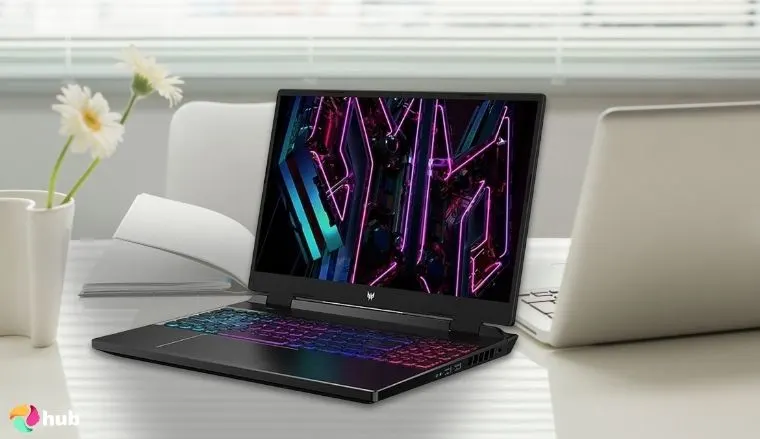
The Acer Predator Helios Neo 16 is the best gaming laptop under $1000. It offers the perfect technical specifications to deliver top-tier performance in gaming and creative activities like video editing and 3D modeling.
The main attraction is the NVIDIA GeForce RTX 4060 graphics card, allowing you to play the latest games like Assassin’s Creed Shadows (60 FPS on high settings with upscaling) and Monster Hunter: Wilds (around 70 FPS on high).
The card’s 8GB of VRAM enables you to play current and future games without issues. Additionally, the display is 16″ with a 1920 x 1200 WUXGA (Wide Ultra Extended Graphics Array) resolution – offering slightly more vertical space than standard Full HD – and a 165Hz refresh rate for clear and crisp visuals. The default RAM capacity is plentiful at 16GB of DDR5, but you can easily upgrade if you don’t mind disassembling the device.
Predator Sense is the proprietary software for controlling the laptop’s various settings. With it, you can enable Turbo mode for maximum performance or tone everything down to keep the fan noise silent while doing lighter tasks. Either way, the laptop never gets uncomfortably hot. There’s also a menu for adjusting the device’s 4-zone RGB backlights to suit your tastes.
Unsurprisingly, this performance leads to the laptop being rather heavy at around 6.17 lbs. The included charger’s power brick is also quite hefty, making this laptop not the best option for on-the-go gaming. However, that’s hardly an issue if you plan on gaming mostly at home, especially when paired with the top Wi-Fi router for a stable connection.
| Pros | Cons |
|---|---|
| ✅ Plenty of I/O options, including an Ethernet port for optimal connectivity ✅ Powerful graphics card and a wide screen for excellent graphics ✅ Adjustable profiles for performance or fan silence with Predator Sense software ✅ Impressive performance at a reasonable price ✅ RGB backlights to customize the laptop’s aesthetics ✅ 16GB of RAM and 512GB of SSD storage, which you can upgrade in the future ✅ Excellent cooling to prevent heat issues | ❌ The unique keyboard layout takes some getting used to |
Final Verdict: The Acer Predator Helios Neo 16 stands out as the best gaming laptop under $1000, offering impressive performance powered by the RTX 4060, a crisp WUXGA display, and versatile software controls.
2. Lenovo LOQ [Best Gaming Laptop with Good Cooling under $1000]
| Specs | Details |
|---|---|
| GPU | NVIDIA GeForce RTX 4050 |
| RAM | 16GB DDR5 |
| CPU | AMD Ryzen 7 8845HS |
| Storage | 512GB SSD |
| Display | 15.6″ FHD 1920 x 1080 IPS 144Hz G-SYNC |
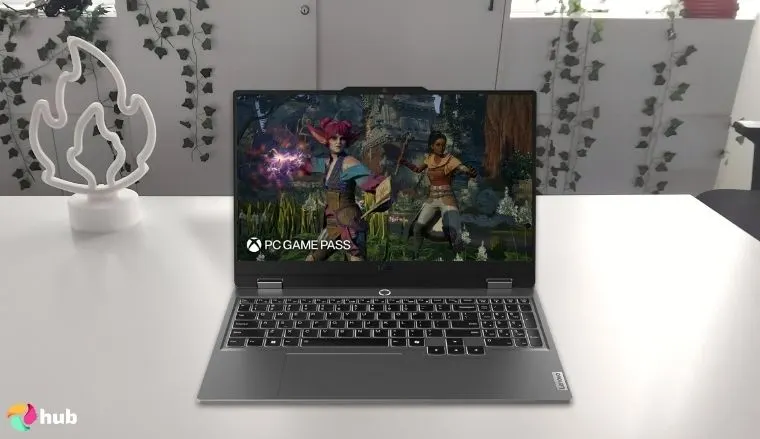
Looking for the best Lenovo laptop that fits your budget? The LOQ is slightly cheaper than the #1 gaming laptop on my list yet offers similar specifications, making it a more price-conscious option. Compared to other Lenovo laptops, the LOQ is a more affordable gaming laptop choice over the more top-tier Legion. However, the LOQ comes with some of its gaming-oriented benefits, such as the Lenovo Vantage software and excellent hardware.
The laptop boasts an NVIDIA GeForce RTX 4050 graphics card, which is more than enough to play many modern titles on high graphical settings. At 1080p, you can expect to play games like Baldur’s Gate 3 and Ghost of Tsushima without noticeable framerate drops. Moreover, since the GPU is paired with a powerful AMD Ryzen 7 CPU, you get to enjoy the perks of G-SYNC and FreeSync in one package for zero screen tearing.
The included Lenovo Vantage software enables you to customize the laptop’s performance to your specific needs. You can switch to silent mode to keep fan noise to a minimum or enable performance mode to push the device to its limit. The app even allows you to overclock the GPU if you dare. To me, the GPU seems powerful enough to perform well without overclocking and even in silent mode.
The laptop’s overall design is great, although visually, it doesn’t have the gaming vibe you’d normally expect. For example, some cheaper models don’t have an RGB backlit keyboard. However, I think that’s a reasonable compromise when picking a budget-friendly gaming laptop. After all, the Lenovo LOQ does not skimp regarding performance.
| Pros | Cons |
|---|---|
| ✅ Good variety of I/O ports, including Ethernet and HDMI for extra monitors ✅ Excellent cooling system to prevent overheating ✅ Good quality speakers and webcam ✅ Includes 3 months of Game Pass ✅ Upgradeable RAM and other vital components ✅ Sturdy build quality without feeling bulky | ❌ Exterior design is pretty standard |
Final Verdict: The Lenovo LOQ offers impressive performance and cooling at a price that’s friendly to budget-conscious gamers.
With the RTX 4050, Ryzen 7 processor, and customizable settings via Lenovo Vantage, it delivers smooth gameplay and efficient thermals. Most definitely the best Lenovo gaming laptop in this price range.
3. Asus TUF Gaming A15 [Best Gaming Laptop for Durability under $1000]
| Specs | Details |
|---|---|
| GPU | NVIDIA GeForce RTX 3050 |
| RAM | 8GB DDR5 |
| CPU | AMD Ryzen 5 7535HS |
| Storage | 512GB SSD |
| Display | 15.6″ FHD 1920 x 1080 IPS 144Hz |
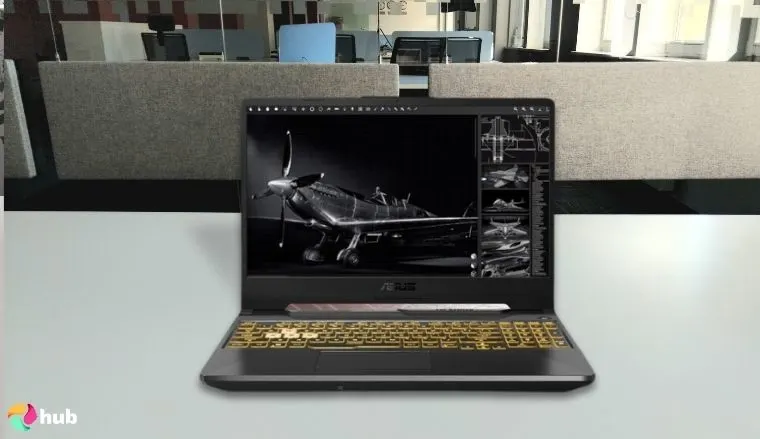
The TUF Gaming A15 is a great Asus gaming laptop for gamers who are frequently on the move. The TUF in the laptop’s name emphasizes the device’s excellent durability and build quality, making it suitable for frequent travelers. The technical specs are also top-notch, albeit with a slight downgrade over the pricier alternatives.
This laptop is powered by the NVIDIA GeForce RTX 3050, which is a decent GPU for playing many modern games. However, this generation of Nvidia GPUs uses DLSS 2.0, which lacks the frame generation feature found in DLSS 3.0 available on newer cards. Even so, the 3000 series cards have enough power to play demanding games like Cyberpunk 2077, albeit on medium settings.
Using the Armory Crate app, you can optimize the laptop’s overall performance and other settings to suit your gaming needs. A notable highlight is the Scenario Profiles feature, which allows you to set certain profiles to enable automatically when launching specific games. Here, you can also adjust the RGB backlight to your tastes. The laptop’s visual design is definitely made for gamers, which is emphasized with the contrasting WASD keys. As for popular games, it’s definitely on of the best laptops for Fortnite in this price range.
Thanks to the laptop’s four heat pipes and three heatsinks, which draw heat away from vital components, there’s no worry about overheating. Moreover, the self-cleaning design ensures that no debris clogs the system, which could interfere with its effectiveness.
| Pros | Cons |
|---|---|
| ✅ Solid selection of I/O ports on each side of the laptop ✅ Armoury Crate proprietary app for easy performance adjustments ✅ Comes with 90 days of Xbox Game Pass ✅ Upgradeable RAM and other components like SSD storage ✅ Eye-catching exterior design with an RGB backlit keyboard ✅ Adaptive-Sync technology to prevent screen tearing | ❌ Fan noise can be pretty noticeable during intensive activities |
Final Verdict: The Asus TUF Gaming A15 stands out for its rugged build and reliable performance, making it the best Asus laptop for gamers who travel often or value durability.
4. Asus TUF Gaming F17 [Best Gaming Laptop with Big Screen under $1000]
| Specs | Details |
|---|---|
| GPU | NVIDIA GeForce RTX 3050 |
| RAM | 8GB DDR4 |
| CPU | Intel Core i5-12500H |
| Storage | 1TB PCIe Gen3 SSD |
| Display | 17.3” FHD 144Hz 1920 x 1080 IPS |
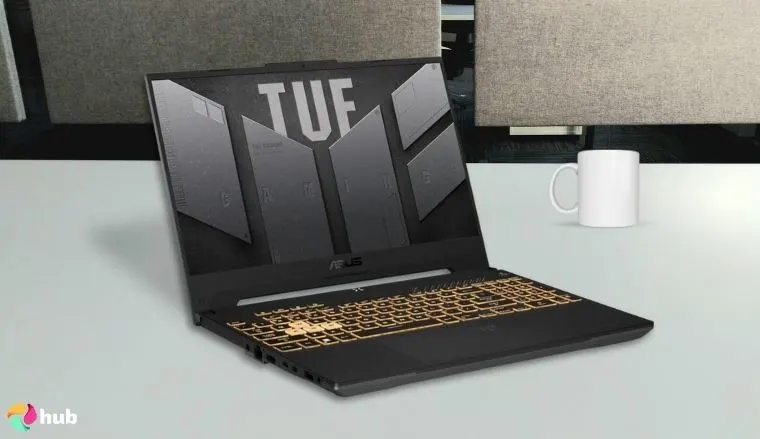
Consider the Asus TUF Gaming F17 if you’re looking for a budget gaming laptop that is considerably larger than other options on the market. The device boasts an impressive 17-inch 1080p display to fit all your games comfortably. It also shares many design cues with the aforementioned Asus TUF Gaming A15, like the TUF name denoting its top-tier build quality that emphasizes its durability in various situations.
Although a larger gaming laptop has its perks, it also comes with some compromises, especially when your budget is under $1000. For starters, this laptop is powered by an NVIDIA GeForce RTX 3050, which is pretty good but not exactly top-of-the-line. Thankfully, since the resolution is 1920 x 1080, you can expect to play many modern games like Baldur’s Gate 3 at high graphical settings without noticeable frame drops.
Another compromise is the included RAM, which is only 8GB of DDR4 memory. It’s good for most cases, but it would be wise to upgrade to DDR5 memory to stay up to date. On the flip side, I’m impressed that the Asus TUF Gaming F17 comes with 1TB of SSD storage space by default. Even better, there’s an additional M.2 slot if you’d like to expand even more.
| Pros | Cons |
|---|---|
| ✅ Good variety of I/O ports on both sides of the laptop ✅ Gamer-oriented exterior design with highlighted WASD keys and RGB backlit keyboard ✅ Built with durability in mind ✅ Impressive 17.3 inch display with a 144Hz refresh rate for immersive gaming ✅ 1TB of SSD storage with an additional M.2 slot for upgrading down the line ✅ Dual-fan cooling system to prevent overheating when playing for extended periods ✅ 56WH battery for solid endurance when unplugged | ❌ Large size and bulky design make it less suitable for travel |
Final Verdict: The Asus TUF Gaming F17 is a solid pick for gamers who want a larger screen without stretching their budget.
While its RTX 3050 GPU and 8GB RAM may limit ultra-high-end performance, the big 17.3″ display, generous 1TB storage, and durable build make it a great value for immersive gaming and media consumption under $1000.
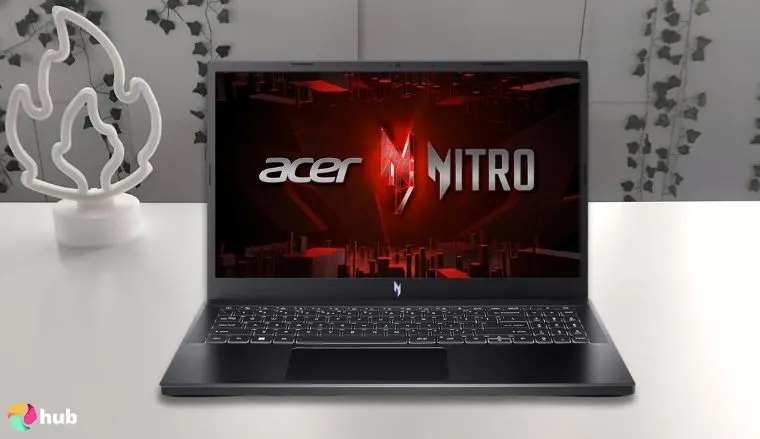
5. Acer Nitro V [Best Gaming Laptop for Casual Gaming under $1000]
| Specs | Details |
|---|---|
| GPU | NVIDIA GeForce RTX 4050 |
| RAM | 8GB DDR5 |
| CPU | Intel Core i5-13420H |
| Storage | 512GB Gen 4 SSD |
| Display | 15.6″ FHD IPS 1920 x 1080 144Hz |
The Acer Nitro V is an affordable gaming laptop with a surprising amount of power. It offers superb performance with its included GPU and CPU, although it’s clear that the laptop’s other hardware is on the cheaper side compared to more expensive laptops. Thankfully, you can remedy these issues by gaming with added peripherals.
The onboard GPU is the NVIDIA GeForce RTX 4050, which is on par with some of the pricier options on this list. It offers great performance when playing modern games, especially if they support DLSS 3.0 and frame generation. Meanwhile, the processor is a 13th-gen Intel Core i5, which greatly complements the graphics card for gaming while also supporting other tasks.
Like most gaming laptops, the Acer Nitro V has a dual fan setup to keep the device from overheating. You can customize those settings using the NitroSense app, which allows you to fine-tune your gaming experience to be focused on performance or silence.
As for compromised areas, the laptop’s screen isn’t great. Although the 144Hz refresh rate is excellent, the display falls short in brightness and color accuracy. But this isn’t a huge issue, especially if you connect an external monitor using the HDMI port.
Some have also complained about the laptop’s built-in speakers, which sound pretty underwhelming. Once again, that’s easily fixed using Bluetooth speakers or headphones.
| Pros | Cons |
|---|---|
| ✅ All the essential I/O ports for gaming and productivity ✅ Excellent specs (RTX 4050 GPU, Intel Core i5 CPU) at a reasonable price ✅ NitroSense app for fine-tuned settings on your laptop ✅ M.2 slot for upgrading your SSD storage ✅ 8GB DDR5 RAM that you can upgrade ✅ Wi-Fi 6 and gigabit Ethernet support for speedy connections while playing multiplayer games ✅ Includes 90 days of Game Pass | ❌ Speaker quality has room for improvement |
Final Verdict: The Acer Nitro V is a strong entry-level choice for casual gamers who want reliable performance without overspending.
Its RTX 4050 GPU and modern Intel CPU handle most titles well, though its screen and audio limitations mean it’s best paired with a few external accessories for an optimal experience.
What To Look for in a Gaming Laptop Under $1,000?
As you can imagine, budget laptops under $1,000 won’t necessarily have a comprehensive all-in-one package, as if you were to double the budget and get a gaming laptop under $2,000.
You must decide which areas are important for your gaming needs and what compromises you are willing to make to elevate those priorities further to get a top gaming laptop for your needs.
Below is a quick buyer’s guide so you’ll know which technical specifications are responsible for which performance metrics.
1. Graphics Card (GPU) – Most Important for Gaming
Everyone knows that the Graphics Processing Unit (GPU), or graphics card, is the most crucial hardware for gaming. It is responsible for rendering the frames while gaming. A more powerful GPU will lead to higher FPS (frames per second) and will support higher graphical settings on games for better visual fidelity. For instance, Dell gaming laptops shine when it comes to GPU so we dedicated a separate roundup to this exceptional and trusted brand.
You should take a long time to consider your GPU needs because usually, it’s impossible to upgrade a gaming laptop’s graphics card. That means you should pick something that can comfortably run current games and upcoming titles that you want to play.
The Nvidia RTX 4000 series and AMD Radeon RX 7000 series cards currently offer an excellent balance between price and performance. Even so, previous-generation cards are worth considering if AAA games and high-end graphics aren’t your priority. Also, check the card’s Video Random-Access Memory (VRAM) count to see if it’s worth considering.
I recommend going for at least 4GB of VRAM.
2. Processor (CPU) – Affects Overall Performance
The Central Processing Unit (CPU) is the second most crucial hardware for gaming and other tasks like programming, video editing, and content creation. Just like the GPU, this hardware is typically soldered to the motherboard, meaning you can’t upgrade it later. Therefore, you should pick a laptop that has a CPU that will last for at least a few years performance-wise.
When evaluating a laptop’s CPU, you should pay attention to the number of cores and threads it offers. As expected, more means better since the CPU can perform more tasks simultaneously using multithreading.
On the other hand, the latest processors aren’t necessary if you don’t plan on playing games dependent on CPU performance. Generally speaking, CPU-heavy games must render numerous different things simultaneously, such as in RTS or top grand strategy games like Crusader Kings III.
Conversely, you might want a more powerful CPU if you want to run more background apps while playing. This is especially vital if you want to stream or record gameplay for content creation while using the best VPN for DDoS protection. Or, maybe you just enjoy switching between your game and a web browser. Learning what is a VPN kill switch will help you stay protected no matter what.
Overall, this generation’s AMD 5 or Intel i5 CPU should comfortably suit most gamers. In terms of your budget, you can expect a step-up even by getting a laptop under $1,500. MSI gaming laptops are a great option to consider in this price range.
3. RAM – Minimum 16GB Recommended
Random Access Memory (RAM) is another vital metric by which you should evaluate a potential gaming laptop under $1000. These days, you need at least 16GB of RAM to run most games without performance issues.
On a positive note, many gaming laptops nowadays have upgradeable RAM slots, meaning there’s no need to worry too much about a device’s default RAM sticks. Still, choosing something good out of the box would be wise to have a great initial experience.
Today, it would be better to choose RAM with DDR5 memory, although the difference over DDR4 isn’t all that significant. Additionally, you may experience better performance by utilizing dual-channel RAM. For example, having two RAM sticks with 8GB of RAM is better than having one stick with 16GB.
4. Storage – SSD for Fast Load Times
Regarding storage, you should pay attention to the amount of space you get and the memory type. I recommend having at least 512GB of storage in an SSD hard drive.
More storage space means more games on your laptop, which is very important since many AAA titles can take up as much as 100GB of space. Conversely, a nice indie game typically requires less space, anywhere between a few hundred megabytes and 10GB.
Cheaper gaming laptops under $500 might offer 256GB of storage, but I know from experience that that’s barely enough for comfortable gaming. After all, the operating system will occupy a good chunk of the default space.
Like with RAM, the storage drives are usually upgradeable, which is excellent news regarding future-proofing your laptop. Most laptops on this list have one SSD hard drive by default and another slot for adding an extra M.2 drive. That means you can expand your storage later without reinstalling the OS and needing to move files.
5. Display – Refresh Rate Matters for Smooth Gameplay
The laptop’s display is a very important factor since you’ll look at it whenever you use your device. Unsurprisingly, a bigger laptop will have a larger display, but you should also consider some technical factors.
The main one is the refresh rate, which I recommend to be at least 144Hz for smooth gameplay. You can go for less if you’re on a tighter budget, but be aware that the display quality won’t be as appealing.
Another factor to consider is at what resolution you’d like to play. The most common sizes for gaming laptops are 1080p and 1440p.
1080p will look great on a smaller laptop, although it might seem stretched on a larger laptop. While 1440p is a considerable upgrade, remember that gaming in higher resolutions also requires a significantly more powerful GPU.
So, ensure the laptop’s display is paired with a powerful GPU to run your desired games at good frame rates. To this end, you should check out some of the best HP gaming laptops we researched in depth.
6. Other Considerations
There are a few other aspects to consider when picking budget gaming laptops, although these will mostly depend on your preferences. Here’s what I recommend thinking about:
| Factor | Description |
|---|---|
| Size | Affects battery life, cooling, and screen size. Larger laptops can house better hardware but are heavier and less portable |
| I/O Ports | Ensure the laptop has all the necessary ports to connect your gaming peripherals |
| Battery Life | Larger batteries allow longer use without needing to plug in |
| Keyboard | Check if the keyboard layout fits your needs (e.g., includes a numpad) |
FAQs
What’s the best gaming laptop under $1000?
The Acer Predator Helios Neo 16 is the best gaming laptop under $1000.
It includes excellent specs (NVIDIA GeForce RTX 4060 GPU, 16GB of RAM, Intel Core i7 CPU) in a well-built laptop that offers great quality in all the right places.
Can you game with integrated graphics?
Yes, you can game with integrated graphics, although the results will vary based on your hardware.
Usually, integrated graphics cards are weaker than dedicated GPUs, meaning you’ll have to play games in lower resolution on lower graphical settings.
Are gaming laptops under $1000 even worth it?
Yes, gaming laptops under $1000 can definitely be worth it, although you’ll most likely need to deal with some compromises.
Most laptops offer great specs to ensure excellent gaming performance, but they might be lacking in other areas, such as build quality, hardware, and storage.
What is a good gaming laptop?
The Acer Predator Helios Neo 16 is a good gaming laptop that’s affordable and has great specifications to ensure smooth performance in modern games.
The Lenovo LOQ is also a great choice if you want a well-rounded gaming laptop that isn’t too expensive.
Who makes the best gaming laptops?
Several brands are known for producing top-quality gaming laptops, with Acer, ASUS, and Lenovo leading the pack.
These manufacturers offer a wide range of models – from powerful high-end machines to more budget-friendly options.