

7 Best Flight Simulator Controls in 2025: Command the Skies

Eneba Hub contains affiliate links, which means we may earn a small commission if you make a purchase through them—at no extra cost to you. Learn more


Recent update
This list is regularly updated to match what’s trending and in-demand among gamers.
When it comes to finding the best flight simulator controls, not all setups offer the same experience. That’s why we’ve spent countless hours testing and interviewing pro gamers to bring you the most reliable, feature-packed options. The stuff we gathered here will give you a clear look at the bigger picture when it comes to flight controls, flight stick features, and everything else, for that matter.
So, no matter if you’re a beginner or a seasoned virtual pilot, choosing the right gear can make all the difference. This guide is here to help you make an informed decision by breaking down the top controllers in 2025, based on real-world feedback and expert opinions. Skip the confusion and find out which flight simulator controls are truly worth your investment.
Jump to:
Our Top Picks for Flight Simulator Controls
The best flight simulator controls should make your runs feel as real as possible. Ideally, you should be able to forget there’s hardware between you and the simulator and just enjoy complete freedom. Here are my top 3 picks that nail the feel, build, and balance every simmer looks for:
- Turtle Beach VelocityOne – The full cockpit feel in one clean unit. Integrated throttle, trim wheel, and status screen make this the easiest plug-and-fly setup for Xbox and PC. Smooth inputs and smart layout are perfect for simmers who want realism without the cable chaos.
- Thrustmaster T.Flight HOTAS 4 – Reliable, simple, and ideal for new pilots. The detachable throttle, responsive stick, and dual rudder controls make it a top entry-level pick that still handles serious flying. Great for Microsoft Flight Simulator or DCS on both PC and PlayStation.
- Thrustmaster Viper TQS – Built for precision and detail. Based on real Viper throttle design, it delivers smooth resistance and tactile feedback that feels straight out of a fighter cockpit. Perfect for military sim fans or anyone who wants fine throttle control without compromise.
Each of these delivers something different – the VelocityOne for all-in-one realism, the HOTAS 4 for pure practicality, and the Viper TQS for precision junkies. Pick the one that fits how you fly, not how it looks on your desk.
7 Best Flight Simulator Controls for the Best Experience
Now, let’s see some of the top expert reviews about the best flight stick controllers. Who knows, you might find your next best flight stick here.
1. Turtle Beach VelocityOne [Best Overall Flight Simulator Controls]
| Specs | Details |
|---|---|
| Flight Yoke Rotation | 180°, true-to-life, with a non-contact hall effect sensor |
| Throttle Quadrant | Modular design with swappable tops, pitch trim wheel, and 10 programmable buttons |
| Rudder/Brake Control | Integrated rudder controls with toe brake buttons |
| Axes and Switches | 12 analog axes, 2 POV switches, 2 four-way HAT switches |
| Flight Display | Full-color display for configuration, training, and timing |
| Compatibility | Xbox Series X |
| Audio | 3.5mm headset jack for immersive audio |
| Mounting | Secure clamping system for home setups |
| Design Features | Customizable lever handles, ambient lighting, real-time alert panel |
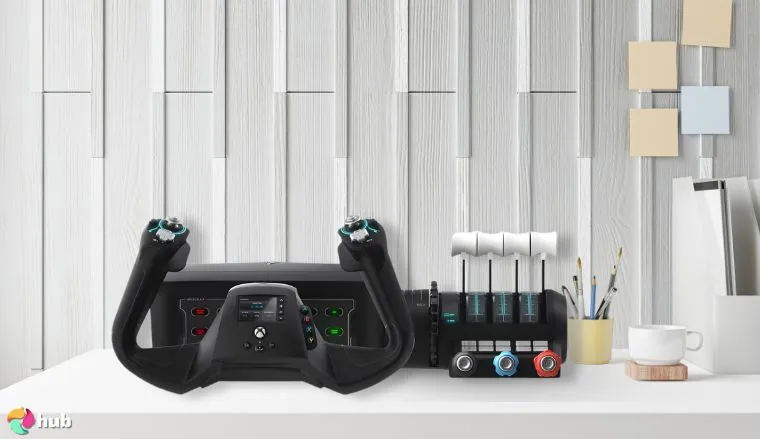
If you’re actually serious about flight sims, the Turtle Beach VelocityOne is a full cockpit experience on your desk. The yoke spins a true 180° with zero dead zones thanks to the hall effect sensor. So every subtle roll, bank, and corrective nudge feels like your hands are on a real plane. The tension isn’t too stiff or floppy; it’s exactly that “just enough resistance” that makes tiny course corrections satisfying.
The throttle quadrant is a modular beast. Swappable tops let you swap between jet-style levers or prop-style handles, and the pitch trim wheel gives millimeter-precise adjustment mid-flight. You’ve got ten fully programmable buttons on the throttle alone, which means flaps, gear, autopilot, lights. You can literally map every function you can imagine. Integrated rudder pedals with toe brakes respond instantly, so footwork feels authentic, and none of that mushy, cheap-controller wobble.
Now, the flight display is a straight-up nerd candy store. Full color, responsive, and configurable on the fly. You can monitor throttle positions, trim adjustments, autopilot modes, and even a live status panel that lights up for alerts or warnings – basically a virtual co-pilot glued to your yoke. Two POV switches, two four-way HATs, and twelve analog axes mean you’re twisting, toggling, and fine-tuning every control input with surgical precision.
Plug it in via USB, and it works instantly with Xbox Series X/S and PCs. Games like Microsoft Flight Simulator 2024 and 2020 feel completely different. Every bank, climb, and descent actually feels like piloting an aircraft. Once you’ve got this setup, going back to a joystick or gamepad feels like pretending you’re flying a paper plane.
| Pros | Cons |
|---|---|
| ✅Full all-in-one flight control system ✅ Realistic 180° yoke rotation ✅ Great for beginners and pros alike ✅ Built-in trim wheel and toe brakes ✅ Customizable throttle levers | ❌ Takes up quite a bit of space, but it’s packed with features |
Final Verdict: If you want to go from casual flyer to “call me Captain,” this is the gear that’ll take you there. It’s super fun to use, looks slick, and honestly? Once you try it, regular controllers feel like toys. Plus, it’s a great addition to complete your flight simulator setup.
2. Thrustmaster T.Flight HOTAS 4 [Best Entry-Level HOTAS for PS & PC]
| Specs | Details |
|---|---|
| Throttle | Full-size, detachable for flexible setup |
| Axes & Buttons | 5 axes, 12 action buttons, 1 rapid-fire trigger |
| Hat Switch | Multidirectional for navigation and panoramic view |
| Rudder Control | Dual system – twist handle or tilting lever |
| Resistance | Adjustable stick tension for comfort and precision |
| Grip | Large hand rest, ergonomic design |
| Base | Weighted for stability |
| Compatibility | PS4, PS5, and PC (Windows 10/11) |
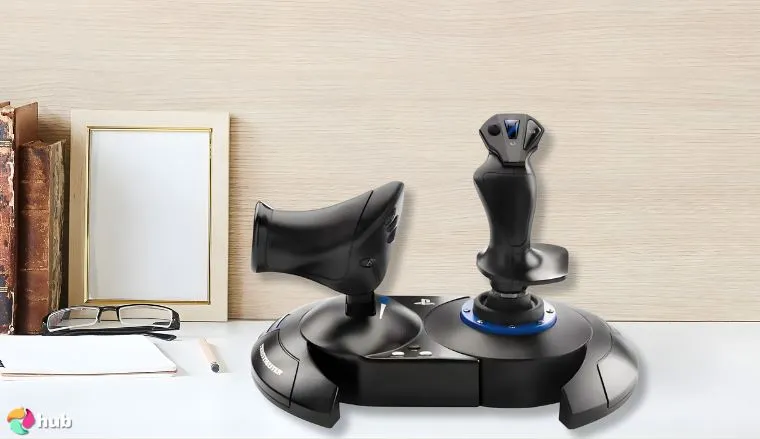
If you’re serious about flying but don’t want to dive into $500+ hardware just yet, the Thrustmaster T.Flight HOTAS 4 hits that sweet middle ground. It feels authentic out of the box – solid throttle, responsive stick, and zero driver drama. Plug it in, pick your aircraft, and you’re flying within minutes.
The detachable throttle is a game-changer. Keep it connected for tighter desk space or split it off for that authentic two-hand setup. The motion feels smooth, the buttons have real feedback, and the adjustable stick resistance lets you fine-tune tension to match your flying style – from slow, deliberate GA flights to fast jet maneuvers.
I loved the dual rudder system during my testing. You can yaw with a wrist twist or use the built-in lever for progressive input. It’s not pedals, but it’s reliable, consistent, and works surprisingly well for both planes and helis. Add in a weighted base and you get solid control with zero desk drift, even during aggressive rolls.
It’s officially certified for PlayStation, but it also runs cleanly on PC. No mapping headaches, no calibration nightmares – just plug, fly, and enjoy the tactile feel that cheap sticks don’t come close to matching.
| Pros | Cons |
|---|---|
| ✅ Detachable throttle for realistic control ✅ Adjustable stick resistance feels premium ✅ Dual rudder options – twist or lever ✅ Solid, stable base that doesn’t wobble ✅ Official PlayStation support ✅ Plug-and-play on PC ✅ Comfortable hand rest for long sessions | ❌ Plastic build feels light compared to higher-end gear ❌ No built-in backlighting or fancy toggle switches |
Final Verdict: The T.Flight HOTAS 4 is the best gateway to real flight sim controls. It’s reliable, comfortable, and precise enough to make every flight feel deliberate – not arcade. If you want to ditch the gamepad and actually fly, this is where you start.
3. Thrustmaster Viper TQS [Best Flight Stick for Combat Flight Sims]
| Specs | Details |
|---|---|
| Type | Throttle Quadrant System (TQS) |
| Scale | 1:1 replica of Viper (F-16) throttle |
| Build | Metal handle casing, die-cast construction |
| Axes | 5 axes, including throttle with detents |
| Buttons | 21 action buttons (2 virtual included) |
| Precision | 16-bit H.E.A.R.T magnetic sensor (65,635 values) |
| Connectivity | USB-C (9.8 ft / 3 m cable) |
| Software Support | Plug-and-play in DCS World, ThrustmapperX for remapping |
| Extras | VR mode, mechanical D-pad, adjustable friction |
| Compatibility | PC (Windows), officially licensed by U.S. Air Force |
| Expandability | Compatible with Viper Panel (sold separately) |
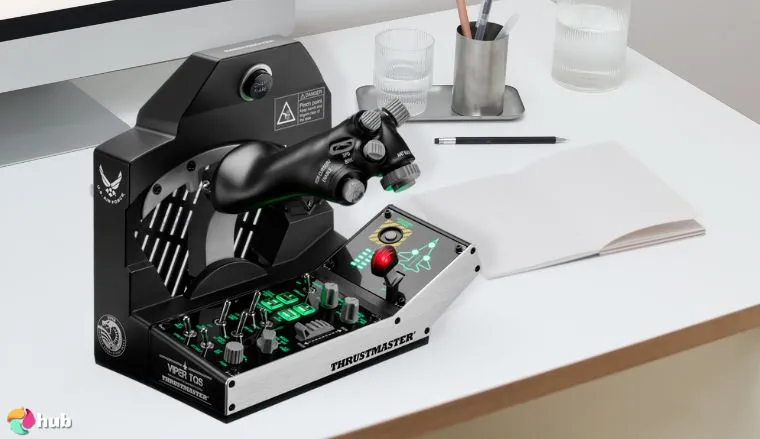
If you’re chasing that fighter jet thrill, the Thrustmaster Viper TQS is basically a slice of an F-16 you can slap on your desk. It’s a 1:1, officially licensed replica of the real Viper throttle, so every switch, lever, and detent feels dead-on like you’re actually in the cockpit. Metal construction, die-cast handles, and tactile counters mean it doesn’t just look the part – it feels like you’re holding a fighter jet throttle.
The detail nerd in me lost it over the controls. There’s a slap switch for countermeasures, Afterburner and Idle detents, and adjustable friction that lets you dial in the throttle exactly how it feels right for you. Five axes, 21 action buttons (including two virtual buttons), and a 16-bit H.E.A.R.T sensor track every movement with insane precision (65,535 discrete values per axis). You push, pull, twist, or nudge, and the sim knows exactly what you meant.
A mechanical D-pad handles extra inputs, and a VR mode toggle keeps your controls in check even when your head is fully immersed in a virtual dogfight. Plug it in via USB-C, and it’s recognized instantly by DCS World. ThrustmapperX lets you remap every button, axis, and detent, so you can craft the exact fighter jet workflow you want.
Every flick of your fingers, throttle adjustment, and countermeasure click, it all just works. The Viper TQS doesn’t feel like a “controller.” It feels like the real thing, giving you full immersion and that locked-in-the-cockpit vibe that turns any combat flight session into a proper pilot experience.
| Pros | Cons |
|---|---|
| ✅ 1:1 replica of F-16 throttle ✅ Plug-and-play with DCS World ✅ Metal switches feel premium ✅ 21 responsive action buttons ✅ Smooth mechanical movement ✅ Adjustable friction for realism | ❌ Pricey compared to entry-level gear, but packed with features |
Final Verdict: The Thrustmaster Viper TQS is as close as you’re going to get to holding an actual F-16 throttle outside a jet. Every switch, detent, and button is built for precision and immersion. For combat flight sim fans, this throttle puts you in the pilot’s seat and makes every dogfight feel real.
4. Honeycomb Bravo Throttle Quadrant [Best Flight Simulator Control with Configurable Throttle Setup]
| Specs | Details |
|---|---|
| Type | All-in-One Throttle Quadrant System |
| Use Case | General Aviation & Commercial Aircraft (Single to Quad-Engine Support) |
| Included Levers | 6 General Aviation + 6 Commercial Levers (with thrust reversers) |
| Throttle Configuration | Fully customizable |
| Additional Controls | Autopilot panel, annunciator panel, gear & flap levers, trim wheel |
| Autopilot Panel | Backlit buttons for high visibility |
| Annunciator Panel | 14 warning lights + 7 programmable switches |
| Gear Lever | With red/green LED gear status indicators |
| Mounting Options | Dual mount: 2 heavy-duty clamps + 3M Micro-Suction pad |
| Connectivity | USB-C |
| Compatibility | PC / Windows, compatible with MSFS, X-Plane, etc. |
| Included in Box | Control body, all levers, protectors, mounting plate, clamps, USB-C cable |
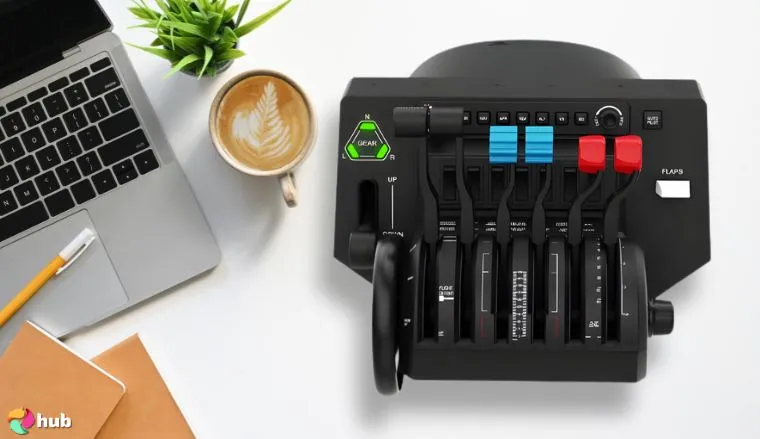
Honeycomb Bravo Throttle Quadrant is a full-scale system built for both GA and commercial aircraft. It ships with 12 interchangeable lever heads – six GA-style for throttle, prop, and mixture, and six jet levers with spoilers, flaps, and thrust reversers. Each jet lever has a built-in detent for reverse thrust, so turboprops and airliners behave like their real counterparts. Throttles can be linked for dual-engine aircraft or run independently for up to four engines.
On top of the throttle controls, you get a full autopilot panel with backlit buttons for HDG, NAV, APR, IAS, ALT, and VS modes. The annunciator panel features 14 bright LED warning indicators for engine fire, low oil pressure, master caution, and more, plus seven programmable toggle switches for mapping additional functions. A mechanical landing gear lever with red/green LED indicators replicates real gear position checks, while the dedicated trim wheel provides continuous analog input for fine pitch control.
Everything is built to full-size dimensions, with lever spacing that mirrors real-world throttle layouts. Lever resistance is adjustable, so you can tighten it for piston planes or keep it smooth for jet flying. The base is reinforced with internal metal for durability, not just lightweight plastic.
Mounting options include dual heavy-duty steel clamps for permanent setups or a 3M micro-suction pad for flat surfaces. The Bravo aligns directly with the Honeycomb Alpha yoke baseplate, so the two can be locked together for a seamless cockpit setup.
Connectivity is via USB-C, with no external power required. It’s fully compatible with Microsoft Flight Simulator (2020 and 2024), X-Plane 11/12, and Prepar3D, and every lever, switch, and button can be custom-mapped through sim software or third-party tools like SPAD.neXt.
The result is more than just a throttle quadrant. It combines throttle, autopilot, annunciator, gear, and trim into one full-scale controller, making it one of the most realistic and versatile flight sim peripherals on PC.
| Pros | Cons |
|---|---|
| ✅ Fully customizable for various aircraft ✅ Includes both GA and commercial levers ✅ Autopilot, gear, and annunciator panels ✅ Strong build quality and durable design ✅ Adjustable lever tension for control feel | ❌ No built-in display, but there are backlit buttons |
Final Verdict: The Honeycomb Bravo Throttle Quadrant is possibly the best pc controller for flight sim enthusiasts who want the ultimate flight simulator experience. It’s versatile, durable, and offers a ton of realism. Plus, you can enjoy easier flight controls and throttle control.
5. Thrustmaster TCA Captain Pack [Best Xbox Flight Simulator Controls]
| Specs | Details |
|---|---|
| Joystick | Ergonomic Airbus sidestick replica |
| Throttle Quadrant | Airbus A320 replica with thrust reverser mechanism |
| Swappable Joystick Heads | 4 modules for customization |
| Buttons | 31 Airbus replica action buttons, 14 remappable tact switch buttons |
| Axes | 4 axes on throttle quadrant |
| Rudder Control | Rotating sidestick handle (lockable/unlockable) |
| Airbus Controls | Trim, landing gear, autobrake, rudder trim, parking brake |
| Compatibility | Officially licensed for Xbox Series X |
| Throttle Mechanism | Built-in thrust reverser |
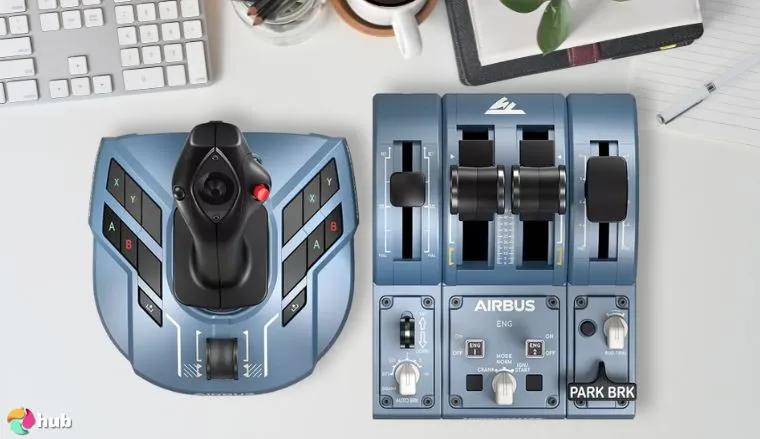
Thrustmaster TCA Captain Pack brings a full Airbus A320-style cockpit to Xbox Series X/S and PC, officially licensed by both Airbus and Microsoft. It combines the ergonomic Airbus sidestick with a dual-engine throttle quadrant, giving you a 1:1 style setup modeled directly after the real aircraft.
The sidestick is built with Airbus’s distinctive ergonomic grip and includes four swappable joystick head modules, so you can configure the button layout to match left or right-seat flying. It has 14 remappable tact switch buttons, plus direct Xbox Guide and Share integration for console control. The stick’s design also includes a built-in rudder axis by rotating the handle, and you can lock or unlock this feature depending on whether you want twist rudder or pedals.
On the throttle side, the quadrant replicates Airbus levers with mechanical detents for idle, climb, flex, and takeoff power. A built-in thrust reverser mechanism is included for realistic landings, while the quadrant’s four axes give you smooth control over both engines and other inputs. Airbus-specific controls are also present: trim, landing gear lever, autobrake, rudder trim, and parking brake (all integrated directly into the hardware).
Altogether, you’re looking at 31 Airbus replica action buttons plus 14 remappable tact switches across the system, so nearly 50 inputs to map functions across Microsoft Flight Simulator. Every axis and button is fully recognized on Xbox without workarounds.
The controls use Thrustmaster’s proprietary H.E.A.R.T. HallEffect sensor technology for 16-bit precision, so inputs don’t degrade over time like traditional potentiometer-based sticks. Build quality is reinforced plastic with solid detents on the throttles, designed to withstand extended sim use.
This setup gives Xbox simmers the kind of cockpit depth that PC users usually need separate peripherals for – sidestick, throttle, rudder, reversers, and Airbus-specific functions are all covered in one kit.
| Pros | Cons |
|---|---|
| ✅ Highly ergonomic with a realistic Airbus sidestick ✅ Fully customizable controls ✅ Built-in thrust reverser and rudder control ✅ Iconic Airbus controls. ✅ Officially licensed by Airbus and Xbox | ❌ May require additional space for setup |
Final Verdict: The Thrustmaster TCA Captain Pack is hands down the best Xbox controller for flight simulators if you want to feel like you’re in a real Airbus cockpit. It’s packed with realistic features, customization options, and superb build quality.
6. Logitech G X56 [Best Throttle and Joystick Flight Simulator Game Controller]
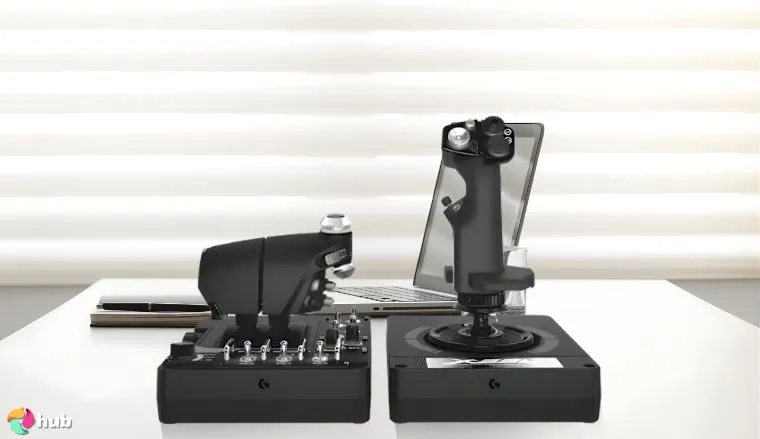
| Specs | Details |
|---|---|
| Military-grade Precision | Customizable options for combat pilots, precise control for space and flight sims |
| Mini Analog Stick Control Surfaces | Control pitch, roll, yaw, backwards, forwards, up, down, left, right, and gimballed weapons separately |
| RGB Backlighting | Customizable RGB lighting for a match with your gaming rig, adjustable via software |
| Ideal for VR | Optimized for VR with controls under your fingers for easy navigation |
| Fully Featured HOTAS | Accurate 16-bit aileron and elevator twist axis with hall-effect sensors. Adjustable stick force, twin throttles with friction adjuster and throttle lock |
| Cable Length | 2 meters (6.56 feet) |
| System Requirements | Windows 11, 10, 8.1, 7; 2x USB 2.0 ports |
The Logitech G X56 HOTAS is engineered to give you military-grade precision and control, designed specifically for flight and space simulation. With customizable options, including mini analog stick control surfaces, the X56 allows you to control all the critical movements like pitch, roll, yaw, and even gimballed weapons, separate from your spacecraft.
RGB backlighting adds to the aesthetic, fully customizable to match your setup, while the design is perfect for VR gaming. It offers an immersive flight simulator experience, with controls positioned perfectly under your fingers for easy access, and subtle differences in button feel for better navigation.
The X56 is designed for combat pilots and serious sim players. All this ensures top-notch performance with its fully featured HOTAS sets, accurate 16-bit sensors, adjustable stick force, twin throttles, and friction adjusters.
| Pros | Cons |
|---|---|
| ✅ Military-grade precision ✅ Customizable mini analog stick ✅ RGB backlighting for a unique feel ✅ Optimized for VR with easy control ✅ Fully featured HOTAS with adjustable stick force | ❌ Requires 2x USB 2.0 ports |
Final Verdict: The Logitech G X56 is the perfect HOTAS system for serious flight sim enthusiasts. With its ideal design for VR, adjustable stick force, and dual throttles, it’s perfect for both combat and space flight simulators.
7. Thrustmaster T-Flight [Best Flight Stick for Microsoft Flight Simulator]
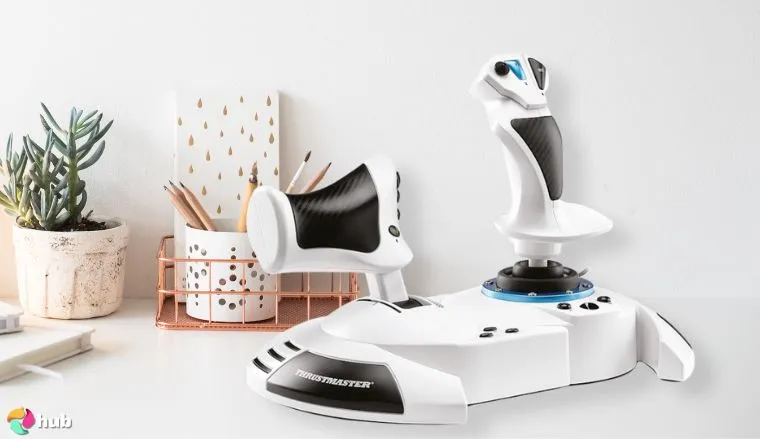
| Specs | Details |
|---|---|
| Official License | Microsoft Flight Simulator Edition |
| Precision | 10-bit with 5 axes (including Z axis rotation) |
| Buttons | 14 buttons + 1 rapid trigger + hat switch |
| Throttle | Detachable for lap or desk play |
| Dual Rudder System | Z-axis joystick or tilting lever |
| Joystick Resistance | Adjustable for different aircraft types |
| Compatibility | Xbox Series X |
| Additional Features | Ergonomic design, wide hand rest |
The Thrustmaster T-Flight Hotas One is a great choice for those looking to play Microsoft Flight Simulator 2024 on Xbox Series X|S or PC. It’s officially licensed by Microsoft and provides an immersive experience with solid precision and control. If you’re looking to create the best flight simulator setup for MSFS, this is a solid start.
It features 10-bit precision, 5 axes, and 14 action buttons, including a rapid trigger and hat switch. The detachable throttle lets you choose between playing on your lap or desk. The dual rudder system gives you two ways to control the aircraft’s lateral movement. You can use the Z-axis joystick or the tilting lever on the throttle.
The buttons are ergonomically placed, and the joystick resistance is adjustable for comfort. This best flight stick is ideal for beginners and works well with different aircraft types. It’s also compatible with the Thrustmaster TFRP rudder (sold separately) for extra realism. If you want a simple yet immersive flight sim experience, the T-Flight Hotas One is a solid choice.
| Pros | Cons |
|---|---|
| ✅Official Microsoft Flight Simulator license ✅ Detachable throttle for flexible play styles ✅ Dual rudder system for more control ✅ Ergonomic layout with adjustable joystick ✅ Affordable entry-level option for beginners | ❌ Limited advanced features for expert pilots |
Final Verdict: The Thrustmaster T-Flight Hotas One is perfect for anyone new to Microsoft Flight Simulator. It’s affordable, comfortable, and easy to use. While it lacks some advanced features, it’s great for beginners. If you’re just starting out, this is one of the best options.
Things to Consider for Flight Simulator Controls
Choosing the right flight simulator controls is crucial for an immersive and enjoyable experience. Here’s why:
- Immersion: Realistic features like HOTAS flight stick setups and rudder foot pedals enhance the feeling of flying.
- Precision: Controls with high precision and adjustable resistance improve accuracy and smoothness in maneuvers.
- Comfort: Ergonomic designs and adjustable features ensure comfort during long flights.
- Versatility: Many systems work across different aircraft, giving you more value.
- Customization: The ability to adjust and swap components lets you tailor controls to your preference.
- Competitive edge: Better controls improve your reaction time and precision, useful in multiplayer games.
The right flight controls can really level up your game, so let’s see more in detail.
1. Type of Control
Choosing the right flight simulator control column is just better in terms of the overall flight simulator experience.
- Joystick – The joystick is perfect for fighter jets and aerobatics, offering precise control. However, it lacks realism for larger aircraft like commercial airliners.
- Flight Yoke – For commercial airliners and cargo planes, the yoke offers realistic handling. But it’s not ideal for quick maneuvers or high-speed jets.
- HOTAS (Hands On Throttle And Stick) – HOTAS excels in combat simulators, providing precise throttle and good stick control. It’s not the best choice for commercial flights.
- Rudder Foot Pedals – For realistic yaw control, rudder pedals are a must. They’re essential during takeoff, landing, and in-flight maneuvers in the best simulation games.
2. Build Quality and Durability
When choosing flight controls, build quality is crucial for longevity and performance. Controls need to withstand frequent use without wear and tear. Metal components often offer superior durability and feel more premium compared to plastic ones, which can wear out faster.
Sturdy construction ensures consistent performance, especially in high-stress movements like throttle adjustments or joystick maneuvers. Investing in well-built gear reduces the risk of malfunctions over time. So, durability is key to an immersive experience when you play flight simulator.
3. Precision and Accuracy
We can all agree that when you play flight simulator, precision is everything. Sensors like Hall effect sensors play a huge role in ensuring smooth, accurate control. These sensors detect changes in magnetic fields, providing highly responsive control inputs.
This means no dead zones or lag in your controls, which is vital for fine maneuvers and precise movements. And it doesn’t matter if you’re playing a general aviation aircraft or a fighter plane, accuracy makes a massive difference. So, if you’re aiming for the best experience in simulation games, look for essential controls with Hall effect sensors for that extra level of precision.
4. Force Feedback
Force feedback is a game-changer when it comes to realism in flight controllers. It’s like the controls come to life, which gives you tactile feedback that matches what you’re doing in the game.
Imagine feeling the resistance when you pull back on the throttle or the vibrations during turbulence; that’s force feedback at work. It adds immersion by simulating real-world forces, like wind resistance or engine thrust, straight into your hands. For the best flight experience, force feedback makes you feel like you’re actually in the cockpit, not just playing a game.
5. Compatibility
Yeah, compatibility is important because you need to enjoy your flight control system on your device. You want your gear to work smoothly with the accompanying software you’re using, like Microsoft Flight Simulator or X-Plane. Most modern flight sticks and HOTAS setups are designed to seamlessly integrate with these big names.
That means plug and play, no fuss. Some controls even have custom profiles for specific games. In case you’re flying solo in a Cessna or piloting a jumbo jet, you’ll want your controls to feel natural and responsive with your chosen simulator.
6. Customization and Programmability
Customization is a game-changer when it comes to flight sim controls. Programmable buttons and switches let you map aircraft functions exactly how you want. Need a quick toggle for landing gear or a specific autopilot function? No problem.
You can assign those actions to any button or switch. This flexibility allows you to streamline your flight simulator setup. You can easily fly general aviation or military jets, and with customizable controls, you can go far far more.
Final Verdict on the Best Flight Simulator Controls
Every simmer’s chasing something different – immersion, precision, realism, or just an easy takeoff after work. After testing all seven, here’s who each setup is really built for:
- For serious sim pilots who want a full cockpit > Turtle Beach VelocityOne – The complete desk rig. Yoke, throttle, trim, rudder, and a digital co-pilot display that makes everything feel legit. Once you fly with it, you’ll never touch a controller again.
- For first-timers ready to ditch the gamepad > Thrustmaster T.Flight HOTAS 4 – Smooth throttle, twist rudder, plug-and-fly simplicity. Feels pro without the price tag, and it’s just as good on PS as it is on PC.
- For combat junkies who live in DCS or War Thunder > Thrustmaster Viper TQS – A 1:1 F-16 throttle with metal switches, detents, and ridiculous precision. It’s the closest you’ll get to an afterburner in your living room.
- For home-rig builders and realism purists > Honeycomb Bravo Throttle Quadrant – All-metal, modular, and tuned for multi-engine control. If you’re wiring panels, tweaking levers, and calibrating trim wheels at 2 a.m., this is your grail.
- For Xbox captains flying Airbus routes > Thrustmaster TCA Captain Pack – Officially licensed, full of Airbus charm, and plug-and-play on console. Feels like sitting in the left seat of an A320, minus the flight hours.
- For VR explorers and space pilots > Logitech G X56 – Dual throttles, endless mapping options, and buttery hall-sensor precision. Perfect for DCS, Elite Dangerous, or anything that leaves the stratosphere.
- For casual flyers who just want to take off and cruise > Thrustmaster T-Flight HOTAS One – affordable, comfy, and officially tuned for Microsoft Flight Simulator. No setup headaches, just throttle up and enjoy the ride.
Each setup speaks to a different kind of pilot – from weekend flyers to full-blown cockpit engineers. Whatever sky you’re chasing, these are the flight simulator controls that make it worth flying.
FAQs
The best flight controls depend on your needs and budget. For serious simmers, a HOTAS (Hands On Throttle and Stick) setup is ideal. For a more budget-friendly option, a simple joystick or flight yoke can still deliver a great experience.
A joystick is a control device used to manipulate the pitch, roll, and yaw of an aircraft in flight simulators. It’s especially useful for precise control during aerobatics and flying smaller aircraft.
A HOTAS (Hands On Throttle and Stick) controller combines a joystick and throttle quadrant. It’s widely used in combat flight simulators for realistic handling of aircraft, allowing you to control throttle and stick movements without taking your hands off the controls.
For a flight simulator, you need at least a joystick or yoke for basic control, and a throttle quadrant for engine power. Rudder pedals enhance realism, and HOTAS setups are preferred for advanced, immersive experiences.
Yes, you can play Microsoft Flight Simulator with a keyboard, but it’s not ideal for a full experience. A joystick or HOTAS provides more precision and control, improving your immersion and gameplay quality.