


7 Best Budget Motherboards for Gaming in 2025

Eneba Hub contains affiliate links, which means we may earn a small commission if you make a purchase through them—at no extra cost to you. Learn more



Recent update
This list is regularly updated to match what’s trending and in-demand among gamers.
When I was building my first gaming PC, finding the best budget motherboard for gaming felt like navigating a maze of specs, chipsets, and price tags everywhere. And while it’s easy to get caught up in GPUs or flashy cases, the motherboard is what ties your whole system together. From performance to flexibility, it plays a huge role in how your system works; it’s basically the backbone of your entire setup.
In this guide, I’ve handpicked reliable, performance-driven boards that don’t break the bank. These motherboards offer strong gaming performance, support for current-gen CPUs and GPUs, and have just the right balance of key features, without charging you extra for things you won’t use.
If you’re a budget-conscious gamer, a student, or just getting into PC building, this roundup will help you make a confident choice.
No fluff, no hype, just motherboards that get the job done without draining your wallet.
Jump to:
Our Top Picks for Budget Gaming Motherboards
These are the top 5 budget-friendly motherboards for gamers and PC builders who want solid performance without overspending. Click a product name to check it out on Amazon, or keep scrolling for a deeper dive into each pick.
- ASUS ROG Strix B650-A Gaming WiFi 6E – Best overall for AMD builds with powerful VRMs and WiFi 6E.
- GIGABYTE B650 AORUS Elite AX – Durable AM5 option offering great connectivity and VRM stability.
- MSI MAG B650 Tomahawk WiFi – Best thermally-optimized budget motherboard for gaming.
- ASUS Prime B650-PLUS – Reliable pick for first-time builders who want smooth AM5 gaming without overspending.
- GIGABYTE X870 Gaming WIFI6 – Future-ready board with USB4 and fast WiFi, perfect for high-end gaming on a budget.
Each motherboard has been selected for its standout features, performance, and value for budget-conscious gamers. From chasing smooth frame rates to future-proof features, this lineup hits the mark for anyone looking for the best budget motherboard for gaming in 2026.
7 Best Budget Motherboards for Gaming Roundup
Choosing the right motherboard can make or break your gaming build, especially when you’re working on a tight budget. This list highlights options that give you the most gaming power for your money, but without sacrificing quality or features.
These picks cover a range of chipsets, brands, and form factors, so whether you’re building around an AMD Ryzen or an Intel Core processor, you’ll find something that fits your setup. Each board has been evaluated based on performance, value, future upgrade paths, and real-world reliability, so you can buy with confidence.
Without any further ado, let’s get to know them.
1. ASUS ROG Strix B650-A Gaming WiFi 6E [Best Overall Budget Motherboard]
Enebameter:
| Specs | Details |
|---|---|
| Chipset | AMD B650 |
| Expansion Slots | 1x PCIe 5.0 x16, 2x PCIe slots 4.0 x16/x4 |
| Networking | 1x PCIe 5.0 M.2, 2x PCIe 4.0 M.2, 4x SATA |
| Storage Slots | 1x PCIe 5.0 M.2, 2x PCIe 4.0 M.2, 4x SATA |
| Form Factor | ATX |
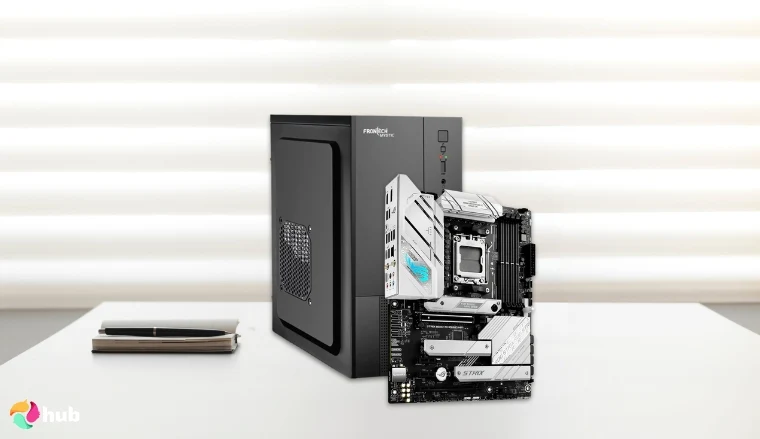
The ASUS ROG Strix B650-A Gaming WiFi 6E stands out as a top-tier choice for gamers seeking high performance without breaking the bank in 2026. Designed for AMD Ryzen 7000 series processors, this motherboard lets you push your CPU hard during intense gaming or streaming sessions, thanks to its stable power delivery backed by a robust 12+2 power stage VRM.
Its support for DDR5 memory up to 6400 MT/s means you can install up to four sticks, letting you max out at 128GB RAM – enough speed and space for gamers and creators alike. The inclusion of PCIe 5.0 for storage ensures future-proofing, allowing for faster SSDs as they become available. Connectivity includes WiFi 6E and Intel 2.5Gb Ethernet: features you’d usually find on motherboards way pricier than this one, so you’re getting top-tier networking without the hefty tag.
The board also features comprehensive cooling solutions, including large VRM heatsinks and M.2 heatsinks to keep temps in check during those intense gaming marathons, making it a top contender among budget gaming motherboards. Plus, it includes handy DIY-friendly features such as Q-Latch for quick M.2 drive installation and Q-Release to easily swap out your graphics card, such great perks under $300.
On the downside, it has only four SATA ports, which might feel tight if you’re packing in lots of storage. For looks, customizable RGB lighting lets you add a personal touch to your setup.
| Pros | Cons |
|---|---|
| ✅ Supports AMD Ryzen 7000 series processors for high performance ✅ WiFi 6E and Intel 2.5Gb Ethernet provide low-latency online gaming ✅ User-friendly BIOS and software utilities for easy system management ✅ Customizable RGB lighting adds aesthetic appeal ✅ Perfect power delivery and thermal design for overclocking | ❌ Limited to four SATA ports, which may be restrictive for users with multiple storage devices. |
Final Verdict: This high-quality gaming motherboard combines robust performance, advanced connectivity, and efficient cooling, making it an excellent all-around choice for budget-conscious gamers seeking premium key features like DDR5 and PCIe Gen 5 without breaking the bank. From video edits to ranked matches, this board packs pro-tier features that matter without bloating the price with stuff you’ll never touch.
2. GIGABYTE B650 AORUS Elite AX [Best Durable Budget Motherboard for Gaming]
Enebameter:
| Specs | Details |
|---|---|
| Chipset | AMD B650 |
| CPU Socket | AM5 |
| Memory Support | DDR5 up to 6400 MHz |
| USB Ports | USB 3.2 Gen 2×2, USB 3.2 Gen 2, USB 2.0 |
| Audio | Realtek ALC1220-VB 7.1 Surround Sound |
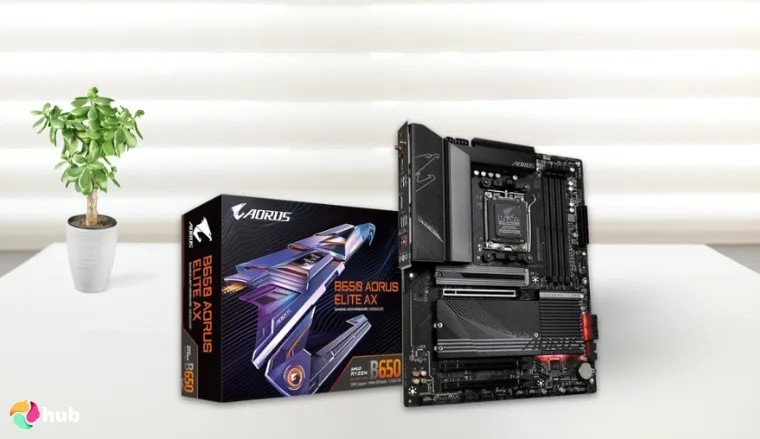
The GIGABYTE B650 AORUS Elite AX is a durable, reasonably-priced gaming motherboard built for gamers who want solid long-term performance without the premium markup in 2026. If you want to update your existing setup with a competing board that has graphics cards and exceptional value, then this is the best choice. Built with AMD’s reliable B650 chipset, this board offers excellent compatibility and stability, making it one of the best budget-friendly options for gamers who demand resilience alongside solid features.
This high-quality gaming motherboard supports AMD Ryzen 7000 series processors and DDR5 memory, ensuring fast and responsive gameplay. Its robust VRM design provides efficient power delivery, which is essential for maintaining performance during intense gaming sessions or overclocking attempts. Featuring integrated WiFi 6E and 2.5Gb Ethernet, the B650 AORUS Elite AX offers versatile and reliable networking for uninterrupted multiplayer gaming experiences.
It offers many USB ports. With multiple PCIe 4.0 slots and ample M.2 storage support, this motherboard balances durability with expandability, making it an excellent choice for budget-conscious gamers wanting a solid foundation for their gaming PC.
| Pros | Cons |
|---|---|
| ✅ High-quality Mini-ITX motherboard optimized for i9-14900K ✅ Supports fast DDR5 memory for better gaming performance ✅ WiFi 6E and Bluetooth 5.3 offer excellent wireless connectivity ✅ PCIe 4.0 support for the latest GPUs and SSDs ✅ Advanced thermal design with M.2 thermal guard | ❌ Limited expansion slots due to size |
Final Verdict: The GIGABYTE B650 AORUS Elite AX is the best durable budget motherboard for gaming, offering robust power delivery, solid build quality, and excellent networking features, making it a reliable choice for gamers seeking long-term value.
3. MSI MAG B650 Tomahawk WiFi [Best Thermally-Optimized Budget Motherboard for Gaming]
Enebameter:
| Specs | Details |
|---|---|
| Chipset | AMD B650 |
| CPU Socket | AM5 |
| Expansion Slots | PCIe 4.0 x16, PCIe 4.0 x1 |
| Storage | 2 x M.2 slots, 6 x SATA 6Gb/s |
| Networking | WiFi 6E, 2.5Gb Ethernet |
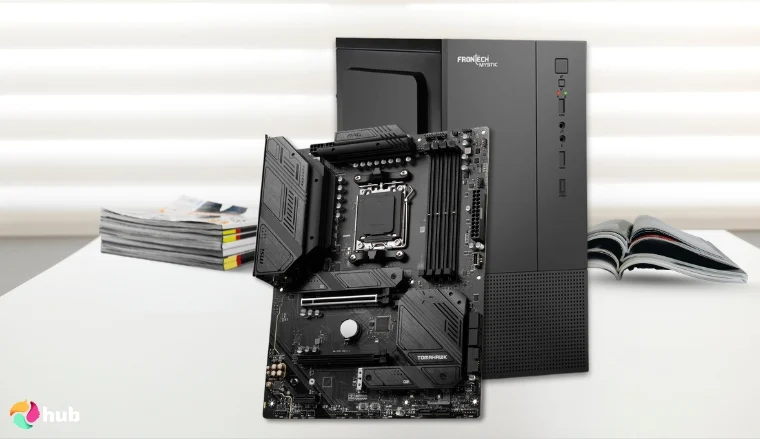
The MSI MAG B650 Tomahawk WiFi stands out as the best thermally-optimized gaming motherboard for those looking to build a powerful yet budget-friendly rig around the AMD Ryzen 7 7800X3D processor. Beyond its efficient heat management, it also brings high-speed DDR5 memory support, reinforced PCIe 4.0 slots, and solid power delivery; essential features for smooth, next-gen gaming in 2026.
The MSI MAG B650 Tomahawk WiFi also nails the essentials for a modern gaming setup. You get reliable DDR5 memory support, fast M.2 storage, solid networking, and a versatile USB lineup. And if you’re eyeing a CPU upgrade later on, this board can even handle a Ryzen 9 7950X.
The board also includes integrated WiFi 6E and 2.5Gb Ethernet for seamless connectivity. You’re getting three M.2 slots right on the board – plenty of speed and storage for most gamers. And if you’re a content creator who doesn’t need more than that, it’s a smart way to save a bit and put that extra cash toward a better GPU or monitor.
| Pros | Cons |
|---|---|
| ✅ Advanced thermal design with extended heatsinks for efficient cooling ✅ Excellent power delivery for stable performance with Ryzen 7 7800X3D ✅ Supports fast DDR5 memory for high-speed gaming ✅ Integrated WiFi 6E and 2.5Gb Ethernet for reliable connectivity ✅ Multiple M.2 NVMe slots for storage expansion ✅ User-friendly BIOS and solid build quality | ❌ Fewer USB-C ports compared to peers ❌ No PCIe Gen 5 |
Final Verdict: The BIOS is beginner-friendly, so even first-time builders won’t feel lost. You’re also getting solid features and thermal optimization in one sturdy package. It’s a great pick for budget gamers who want to push their Ryzen 7 7800X3D without overspending.
4. ASUS Prime B650-PLUS [Best Entry-Level AM5 Budget Motherboard for Gaming]
Enebameter:
| Specs | Details |
|---|---|
| Chipset | AMD B650 |
| CPU Socket | AM5 |
| Expansion Slots | 1 x PCIe 5.0 x16, 2 x PCIe 4.0 x16, 2 x PCIe 4.0 x1 |
| USB Ports | USB4, USB port 3.2 Gen 2 Type C port, plus others |
| Networking | WiFi 6E, 2.5Gb Ethernet |
| Cooling Solutions | VRM, M.2, PCH heatsinks, hybrid fan headers |
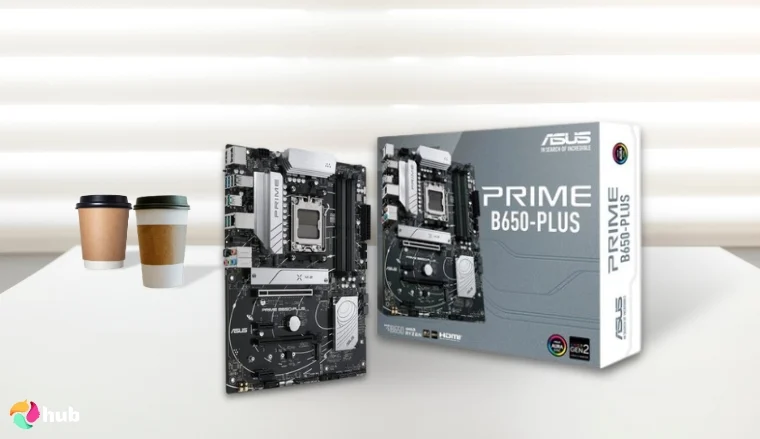
The ASUS Prime B650-PLUS is a high-quality entry-level AM5 budget motherboard for gaming. It delivers solid performance for gamers who want to build a reliable and cost-effective system. Supporting the latest AMD Ryzen 7000 series processors, this motherboard offers DDR5 memory and PCIe 5.0 M.2 slots for fast data transfer and future-proof expansion.
With Realtek 2.5Gb Ethernet, it ensures stable and fast networking, essential for smooth online gaming. The motherboard’s comprehensive cooling solutions, including VRM, M.2, and PCH heatsinks, hybrid fan headers, and Fan Xpert 2+ software, help maintain optimal temperatures even under heavy gaming loads. In addition to that, it has a reasonable price when it comes to gaming motherboards.
The ASUS Prime B650-PLUS also features USB4 support for high-speed connectivity and Aura Sync RGB lighting, allowing gamers to customize their system aesthetics. Its robust power design and BIOS FlashBack provide easy updates and stable overclocking potential, making it a great foundation for a gaming PC.
While it doesn’t come with WiFi 7, most setups don’t even take full advantage of that yet. You can always throw in a separate WiFi card or adapter later if needed.
| Pros | Cons |
|---|---|
| ✅ Supports latest AMD Ryzen 7000 CPUs DDR5 and PCIe 5.0 support for future-proof builds ✅ Realtek 2.5Gb Ethernet for fast networking ✅ Comprehensive cooling for stable performance ✅ USB4 support for high-speed data transfer ✅ Aura Sync RGB for customizable aesthetics | ❌Lacks Thunderbolt connectivity ❌ Only 2 spots for M.2 SSDs |
Final Verdict: The ASUS Prime B650-PLUS is a reliable entry-level AM5 gaming motherboard that offers essential features and solid performance, making it ideal for gamers building their first Ryzen 7000 series PC on a budget.
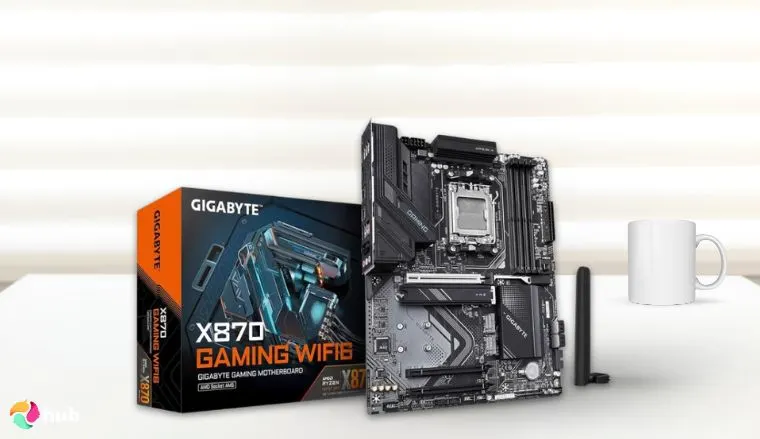
5. GIGABYTE X870 Gaming WIFI6 [Best High-End Budget Gaming Motherboard with USB4 Support]
Enebameter:
| Specs | Details |
|---|---|
| Chipset | AMD B650 |
| CPU Socket | AM5 (LGA 1718) |
| Connectivity | PCIe 5.0, Dual USB4, USB-C (front/rear) |
| Expansion Slots | 1 x PCIe 5.0 x16, 2 x PCIe 4.0 x16, 2 x PCIe 4.0 x1 |
| USB Ports | USB4, USB port 3.2 Gen 2 Type C port, plus others |
| Memory Clock Speed | 5600 MHz |
| Storage Support | 3x M.2 Slots |
The GIGABYTE X870 Gaming WIFI6 is seriously one of the best budget motherboards for gaming out there. If you’re building a gaming PC but don’t want to blow your cash, this board packs a ton of punch without the crazy price tag.
It’s built for AMD Ryzen AM5 chips, supports PCIe 5.0, and lets you load up to 256GB DDR5 RAM — perfect for squeezing every bit of maximum performance out of your rig.
This budget motherboard doesn’t mess around when it comes to power. With a solid 8+2+2 phase design, it gives you strong power delivery so even if you slap in a high-end CPU, it’ll keep things steady. Plus, the ATX form factor means you get plenty of PCIe slots and a bunch of USB ports – including USB4 and handy Type C ports on the rear IO – which makes hooking up gear super easy.
Setting up is smooth thanks to gamer-friendly features like PCIe and M.2 EZ-Latch, easy BIOS updates, and an EZ-Debug zone for quick troubleshooting. Whether you’re upgrading an existing setup or piecing together a new rig, this board has the key features to keep you moving fast.
Storage-wise, you get multiple NVMe storage slots and four SATA ports, so there’s plenty of room for your fast SSDs and other storage drives.
It’s true it’s missing the newest WiFi 6E or WiFi 7 wireless tech, but the built-in WiFi 6 and 2.5Gb Ethernet still deliver low ping and smooth streaming for online gaming.
Compared to other competing boards at the same price, you get more USB ports and a cost-effective option that’s perfect if you’re on a tight budget but still want gear that’s pretty much future proof.
| Pros | Cons |
|---|---|
| ✅Supports the latest AMD Ryzen 9000 series CPUs ✅ Fast DDR5 support with AMD EXPO compatibility ✅ Excellent networking with WiFi 6 and 2.5GbE LAN ✅ EZ-Latch and EZ-Debug features make installation user-friendly ✅ Advanced thermal design protects VRM and M.2 components | ❌Not ideal for ultra-compact builds |
Final Verdict: A feature-packed, high-performance gaming motherboard with future-ready connectivity and strong thermal solutions, ideal for gamers using Ryzen 9000 CPUs on a budget.
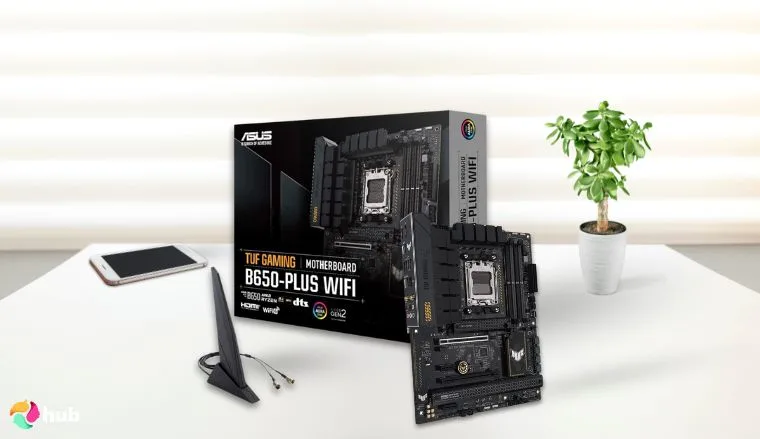
6. ASUS TUF GAMING B650-PLUS WIFI [Best Budget Gaming Motherboard with Military-Grade Durability]
Enebameter:
| Specs | Details |
|---|---|
| Chipset | AMD B650 |
| CPU Socket | AM5 |
| Connectivity | PCIe 5.0, Dual USB4, USB-C (front/rear) |
| Networking | WiFi 6, Realtek 2.5 Gb LAN, TUF LANGuard |
| USB Ports | USB4, USB 3.2 Gen2x2 Type-C, Front USB-C |
| Memory Clock Speed | 5600 MHz |
| Storage Support | PCIe 5.0 M.2 |
The ASUS TUF GAMING B650-PLUS WIFI is a cost-effective option for gamers on a tight budget who want solid performance. Built on the AMD B650 chipset, it supports fast DDR5 memory for smoother gameplay and quicker load times, plus PCIe 5.0 M.2 slots and USB4 connectivity for speedy storage and peripherals.
Its 12+2 power stages, ProCool sockets, and alloy chokes gives strong power delivery to handle CPUs like the Ryzen 7 7800X3D, while large heatsinks and Fan Xpert 2+ keep things cool during long sessions.
Ease of use is a strong point with Q-Latch for M.2 drives, Q-LED debug codes, and an integrated I/O shield that speeds up installation. The ATX form factor offers plenty of PCIe slots and many USB ports, including front panel USB-C and WiFi 6 for reliable connectivity.
Although it lacks WiFi 6E or WiFi 7 and has fewer SATA ports that might limit storage options, it still packs great features found on pricier boards at a reasonable price. Still solid pick for a gaming PC build on a tight budget.
| Pros | Cons |
|---|---|
| ✅ Highest-grade durability and stable power delivery ✅ PCIe 5.0 and DDR5 support for fast data and memory speeds ✅ USB4 and modern connectivity options ✅ Excellent thermal solution with Fan Xpert 2+ ✅ Integrated AI noise cancellation for better comms | ❌ No integrated graphics card support ❌ Just one M.2 PCIe Gen 5 slot |
Final Verdict: It is a solid budget motherboard for 7800X3D or any Ryzen AM5 chip, the TUF B650-PLUS WiFi balances durability, performance, and next-gen features for gaming. It has all important basics that gamers use without much fancy nice-to-have’s to up the price.
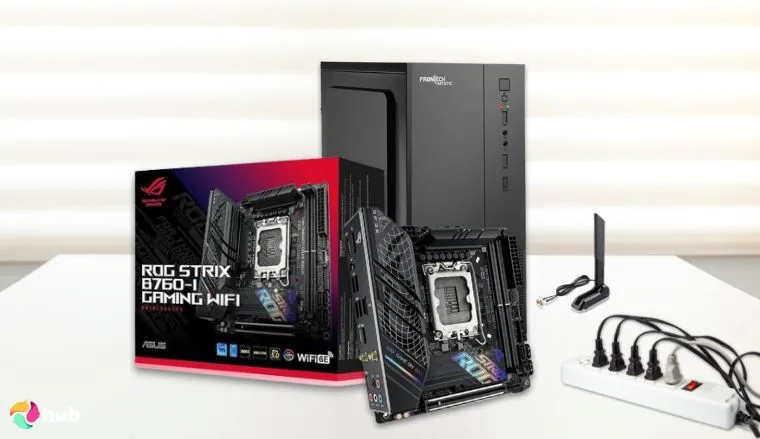
7. ASUS ROG Strix B760-I Gaming WiFi [Best Mini-ITX Budget Motherboard for Gaming]
Enebameter:
| Specs | Details |
|---|---|
| Chipset | Intel B760 |
| CPU Socket | LGA 1700 |
| Networking | WiFi 6E, Bluetooth 5.3, 2.5Gb Ethernet |
| USB Ports | USB ports 3.2 Gen 2×2, USB ports 3.2 Gen 2, USB ports 2.0 |
| Audio | SupremeFX 7.1 Surround Sound |
The ASUS ROG Strix B760-I Gaming WiFi packs serious power into a tiny Mini-ITX form factor, which makes it a top pick for enthusiast builders rocking an i9-14900K who need a compact but high-performance gaming PC.
This board supports high-speed DDR5 memory that allows for 64GB of fast RAM, plenty of storage drives options including NVMe SSDs and four SATA ports, plus loads of USB ports to plug in all your gear.
With integrated WiFi 6E and Bluetooth 5.3, it delivers fast and reliable wireless connectivity for seamless online gaming and streaming. The inclusion of PCIe 4.0 support and multiple M.2 slots allows gamers to install fast NVMe SSDs and powerful GPUs to maximize gaming performance.
The ASUS ROG Strix B760-I balances size and power efficiently, making it one of the best Mini-ITX motherboards for i9-14900K on a budget, perfect for building a sleek yet powerful gaming PC build.
| Pros | Cons |
|---|---|
| ✅ High-quality Mini-ITX motherboard optimized for i9-14900KLimited expansion slots due to size ✅ Supports fast DDR5 memory for better gaming performanceFewer SATA ports compared to larger boards ✅ WiFi 6E and Bluetooth 5.3 offer excellent wireless connectivitySmaller form factor limits cooling options ✅ PCIe 4.0 support for the latest GPUs and SSDs ✅ DIY-friendly design with pre-mounted I/O shield and M.2 Q-latch | ❌ Fewer SATA ports compared to larger boards |
Final Verdict: The ASUS ROG Strix B760-I Gaming WiFi is the best mini-ITX budget motherboard for gaming, offering a compact yet powerful solution tailored for the i9-14900K, with excellent connectivity and maximum performance for small-form-factor builds.
What To Look for in a Budget Gaming Motherboard?
Choosing the best budget motherboard for gaming involves more than just picking the cheapest option. It’s essential to consider several key factors that directly influence your gaming performance and system longevity.
The right gaming motherboard ensures your CPU, memory, and other components work seamlessly together, delivering smooth gameplay and responsiveness without breaking the bank. From chipset selection to expansion options, understanding what matters most can help you build a reliable and future-ready gaming rig without overspending.
1. Chipset
The chipset acts as the motherboard’s communication hub, connecting the CPU to other components like memory, storage, and peripherals. A higher-quality chipset supports advanced features such as faster data transfer, overclocking capabilities, and multiple GPU setups.
For gamers, choosing a motherboard with a modern, feature-rich chipset ensures stable performance and compatibility with the latest gaming technologies, maximizing your investment. Below are some important points that add value:
- Supports the latest CPU features
- Determines overclocking potential
- Affects connectivity options (USB, PCIe lanes)
2. Memory Support
RAM speed and capacity significantly affect gaming smoothness and load times. A gaming motherboard that supports high-speed DDR4 or DDR5 RAM lets you run demanding titles more efficiently, reducing lag and stuttering. Look for gaming motherboards supporting at least 16GB of RAM with room for future upgrades.
Faster memory also helps improve frame rates and multitasking during gameplay. If you want a quick overview, take a look at following points:
- Maximum RAM capacity
- Supported RAM speed (MHz)
- Number of RAM slots
3. VRM Quality
The Voltage Regulator Module (VRM) controls the power delivered to your CPU. High-quality VRMs provide stable and efficient power, which is crucial for gaming systems running intense workloads or overclocked CPUs.
A motherboard with robust VRMs helps maintain consistent performance, prevents overheating, and extends the lifespan of your components, ensuring reliable gaming sessions. When checking out VRM quality, make sure you are also looking up for the following points:
- Ensures stable power delivery
- Prevents overheating
- Supports CPU longevity and performance
4. Future Upgradability
Gaming demands evolve, so choosing a motherboard that supports upcoming CPU generations, faster memory standards, and newer connectivity options protects your build from becoming obsolete too soon. Features like PCIe 5.0 support, extra RAM slots, and updated BIOS utilities provide flexibility to upgrade without replacing the entire system, saving money in the long run. Here are some of the key points you need to check for:
- Support for upcoming CPU generations
- Multiple PCIe slots for GPUs or expansion cards
- Upgradable BIOS support
5. Compatibility
Compatibility is one of the most crucial factors when choosing a budget gaming motherboard. Your motherboard must support your chosen CPU in terms of socket type and chipset. For example, Intel boards require careful matching with the correct generation of Intel processors, using an LGA1700 socket board with 12th, 13th, or 14th Gen CPUs ensures seamless performance
Compatibility also extends to form factor, RAM type, and power requirements. Picking the right motherboard prevents hardware conflicts and guarantees smooth installation and operation. Below are a few important bullets you need to check
- CPU socket type
- Form factor compatibility
- Support for storage and GPU types
6. Expansion Slots
Expansion slots allow you to add extra components like graphics cards, sound cards, or additional storage. A budget motherboard with sufficient PCIe slots and M.2 slots lets you customize and enhance your gaming setup as needed.
This flexibility is especially valuable for gamers looking to upgrade or tweak their rigs over time without limitations.
Below are some key points you need to know:
- Number of PCIe x16 and x1 slots
- Support for NVMe SSDs and other peripherals
- Balance between slots and motherboard size
FAQs
What is the best budget motherboard for gaming?
The best budget motherboard for gaming like the ASUS ROG Strix B650-A Gaming WiFi 6E offers a balance of performance, features, and affordability. It supports the latest CPUs, fast memory, and essential connectivity to ensure smooth gaming without overspending.
Is it OK to have a cheap motherboard?
Yes, it is alright to have a cheap motherboard if it meets your gaming needs. A budget motherboard can deliver reliable performance, but be sure it supports your CPU, RAM, and has adequate features for your setup.
Do expensive motherboards make a difference?
Expensive motherboards often include advanced features, better build quality, and improved power delivery. However, for most gamers, mid-range or budget motherboards provide excellent performance without the premium price.