9 Best ASUS Laptops in 2025 for Creativity, Work, and Play

Eneba Hub contains affiliate links, which means we may earn a small commission if you make a purchase through them—at no extra cost to you. Learn more


Finding the best ASUS laptop can be quite a task, as ASUS offers everything from ultra-thin work machines and creator-focused notebooks to high-performance gaming rigs. But with so many models (and endless spec sheets) to sift through, decision paralysis is real.
Maybe you need a dependable work companion, a color-accurate canvas for art and design, or a performance beast for gaming? Then this guide has you covered. I’ve handpicked the best ASUS laptops to help you find the perfect match for your needs and budget.
Jump to:
Our Top Picks for ASUS Laptops
Not all ASUS laptops are created equal, even within their own fields. However, some of these ASUS models stood out as all-around great picks. These are:
- ASUS Vivobook S14 – A great midrange model that packs a Ryzen AI CPU and Radeon 880m. Decent for both work and play and not too expensive, either.
- ASUS Chromebook Detachable CM3001 – A detachable laptop-tablet hybrid that’s a solid pick for shoppers on a budget. While not the strongest laptop here, it is very versatile.
- ASUS ROG Strix Scar 18 – When it comes to gaming performance, it’s hard to contest the ROG line’s supremacy. This variation comes with an even meatier CPU-GPU combo, enhanced cooling, and a vivid display for gaming dominance.
9 Best ASUS Laptops for Every Need
Not everyone has the same “best” laptop in mind. Some may want a midrange computer with good enough specs, wi-fi, and lots of connectivity. Others might want a gaming machine with an Intel Core Ultra 7, Ultra 9, or an AMD Ryzen AI CPU. Still others might be searching for a thin and light 2-in-1 laptop. Rest assured that there’s something for everyone here.
Now, without further ado, let’s have a look at the candidates for the best ASUS laptop.
1. ASUS Vivobook S 14 [Best Overall]
| Specs | Details |
|---|---|
| CPU | AMD Ryzen AI 9 365 Processor @ 2.0GHz |
| GPU | AMD Radeon 880M |
| RAM | 32GB |
| Display | 14’’, 2880×1800, 120Hz |
| Storage | 1TB, 2TB, 4TB |
| Battery Life | 75Wh |
| Weight | 1.30kg/2.87lbs |
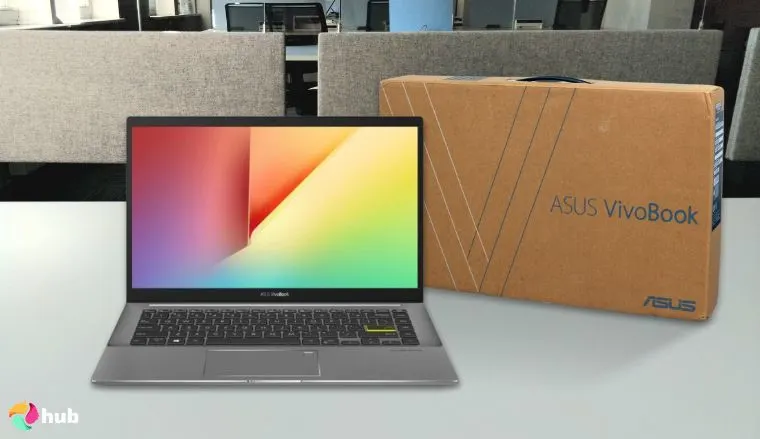
When it comes to ASUS laptops, it’s incredibly difficult to beat the ASUS Vivobook S 14 series. This laptop is sleek, well-designed, and a powerful, above average laptop that’s “just enough” while its low price helps you save money.
Let’s run through the specs. As I said above, this is a “just enough” laptop and it comes with a decent CPU/GPU combination of a 10-core AMD Ryzen™ AI 9 365 at 2.0GHz (yes, a next-gen AI-powered CPU) and an AMD Radeon 880M. Not enough to run everything on ultra or epic settings, sure, but it’ll easily clear medium to high settings on modern games.
The ASUS Vivobook S 14 comes with 32GB of RAM, which is about standard for modern gaming. This package also comes with a configurable 1, 2, or 4TB of storage space; 2 is plenty, but more is always better.
What distinguishes this ASUS laptop from its peers is how ergonomic it is. Physically, the ASUS Vivobook S 14 weighs just 1.3kg/2.87lbs, and has a profile of just 1.39cm. This makes this laptop the ideal companion for work or entertainment on the go, with a radiant 14’’ 2880×1800 OLED display that runs at 120Hz, ensuring you get premium visuals.
Last, but definitely not least, is its battery. One might think that the small profile and solid CPU/GPU combo would take a toll on battery life, but no. This ASUS laptop comes with a small yet mighty 75Wh battery, which battery life tests have shown can last for up to 15 hours on a low load.
| Pros | Cons |
|---|---|
| ✅ Offers a great CPU/GPU/RAM combo that’s fantastic for mid to high-end gaming. ✅ Isn’t too expensive for the amount of power it offers ✅ Sleek and portable design ✅ Amazing OLED visuals ✅ RGB keyboard | ❌ It’s not difficult to find stronger gaming laptops, though the M5406 is still the clear winner in terms of design and portability. |
Final Verdict: The ASUS Vivobook S 14 strikes the perfect balance between performance, portability, and value, making it an exceptional all-rounder for work, entertainment, and everyday use.
2. ASUS Chromebook Detachable CM3001 [Best Budget]
| Specs | Details |
|---|---|
| CPU | MediaTek Kompanio 520 2.0 GHz |
| GPU | ARM Mali-G52 MC2 |
| RAM | 4GB |
| Display | 10.5’’, 1920×1200 |
| Storage | 64GB |
| Battery Life | 38Wh |
| Weight | 0.61kg/1.34lbs |
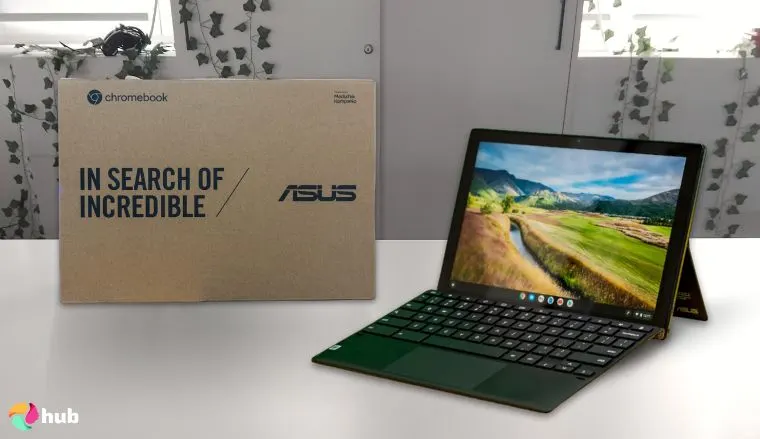
Is it an ASUS laptop? A tablet? ASUS asks: Why can’t it be both? Meet the ASUS Chromebook Detachable CM3001.
Chromebooks are Google’s answer to Apple iPads, and they’ve come out of the game strong. The hybrid device market hasn’t been explored to its utmost, and it turns out that there are a lot of people that will benefit from having a decently strong, versatile hybrid device.
You might have noticed that this device uses a mobile CPU and GPU; namely, a 2.0GHz MediaTek™ Kompanio 520 and an ARM Mali-G52 MC2, respectively. These aren’t particularly powerful specs (especially if we’re running them against dedicated laptop or PC hardware) but they’ll do in a pinch.
Adding on to these specs is just 4GB of RAM, along with 64GB of storage space. All of this means that while you technically can game on this device (especially via streaming), don’t expect too much out of it. Still, the ability to stream games for a low, low price makes this laptop a good contender for the best gaming laptops under $1000.
But while the ASUS Chromebook Detachable CM3001 is no juggernaut when it comes to power gaming, it’s unmatched in its ability to offer versatile, all-day productivity in a compact and durable package.
The ASUS Chromebook Detachable CM3001 isn’t called a hybrid for nothing. This device comes with a detachable board that allows it to transition from laptop to tablet at any moment, which makes it the perfect partner for people on the go. Artists will also especially appreciate the two-way, push-pop stylus for touch input.
| Pros | Cons |
|---|---|
| ✅ Decent specs for a mobile device ✅ Offers amazing versatility and mobile functionality ✅ Can swap between handheld tablet and mini laptop via a detachable board ✅ Very affordable ✅ Backlit keyboard | ❌ The screen isn’t glare-proof, though it is gorgeous |
Final Verdict: The ASUS Chromebook Detachable CM3001 delivers outstanding portability and versatility with its tablet-to-laptop design, making it a budget-friendly choice for users who need an affordable, all-day companion for work, study, or creativity on the go.
3. ASUS ROG Strix Scar 18 [Best for Gaming]
| Specs | Details |
|---|---|
| CPU | Intel Core Ultra 9 Processor 275HX 2.7 GHz |
| GPU | NVIDIA GeForce RTX 5070 Ti |
| RAM | 32GB |
| Display | 18’’, 2560×1600, 240Hz |
| Storage | 1TB (upgradable) |
| Battery Life | 90Wh |
| Weight | 3.30kg/7.28lbs |
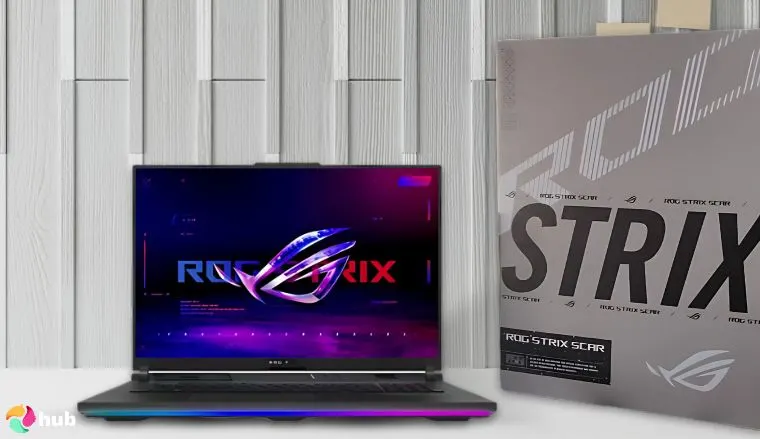
If what you’re looking for is pure gaming performance, you can’t go wrong with the ROG Strix line of ASUS gaming laptops. Each of these powerful gaming laptops are monsters when it comes to high-end gaming, and the Scar 18 is no exception. This beast doesn’t just give you a competitive edge. It also lets you dominate, which easily earns it a spot among the best gaming laptops.
As this is a relatively new laptop, you can expect the specs to be up to date. And rightly so: the Scar 18 houses an Intel Core Ultra 9 Processor 275HX, with an advertised speed of 2.7GHz but the capacity to hit 5.4GHz at full load. GPU-wise, we’ve got a very beefy RTX 5070 Ti, a modern, high-power GPU that uses Blackwell architecture.
When it comes to RAM and storage, this excellent laptop doesn’t disappoint. By default, this laptop comes with 32GB of RAM and a 1TB storage drive (at least, this bundle does). Luckily, these are upgradable: RAM can be bumped up to a hefty 64GB, and storage can similarly be replaced and improved via 2 PCIe slots.
For power, the Scar 18 comes with a meaty 90Wh battery, which sports excellent battery life. Do keep in mind that battery tests assume low to medium loads, so if you need to conserve power, be sure to lower your settings as needed.
Finally, this premium gaming laptop comes with a mini-LED in the form of Nebula HDR, which results in bright and distinct visuals with a 240Hz refresh rate, though you can also use the HDMI 2.1 port to connect the laptop to a great gaming TV.
| Pros | Cons |
|---|---|
| ✅ Incredibly powerful specs that can easily handle games on ultra settings ✅ Solid hardware that not only offers great performance but also future-proofing ✅ Fantastic, vivid display thanks to ROG Nebula ✅ End-to-end vapor chamber and tri-fan design greatly reduce heat buildup ✅ Comes with Windows 11 and 3 months of Xbox Game Pass | ❌ Superb performance doesn’t come cheap, but it’s definitely worth it. |
Final Verdict: The ASUS ROG Strix Scar 18 stands as a top-tier gaming laptop, offering exceptional performance, stunning visuals, and advanced cooling that make it perfect for gamers looking to dominate every match.
4. ASUS Zenbook DUO [Best OLED]
| Specs | Details |
|---|---|
| CPU | Intel Core Ultra 9 Processor 285H 2.9 GHz |
| GPU | Intel Arc Graphics |
| RAM | 32GB |
| Display | 14’’, 2880×1800, 120Hz |
| Storage | 1TB |
| Battery Life | 75Wh |
| Weight | 1.65kg/3.64lbs |
If the ASUS Chromebook Detachable CM3001 is the artist’s budget tool, the ASUS Zenbook DUO is the premium version. This small, light laptop boasts plenty of power sure to satisfy artists, workers, and anyone who needs a strong yet portable laptop.
Don’t let the ultra-thin 0.57’’ profile fool you: the ASUS Zenbook DUO is mighty. Not only does it come with an Intel Core Ultra 9 285H, it also has an onboard Neural Processing Unit. I won’t delve into it too much, but suffice to say that it does let you squeeze out quite a bit more performance from this laptop.
When it comes to the GPU, it’s kind of a mixed bag. The ASUS Zenbook page doesn’t detail what the model of the integrated graphics is, only noting that it’s Intel Arc Graphics. While the Intel Arc series is reliable, keep in mind that it’s not as strong as a dedicated GPU.
If, however, you just need the ASUS Zenbook DUO for work or art, its GPU, coupled with 32GB of RAM, provides enough performance for pretty much any task you’ll need to do.
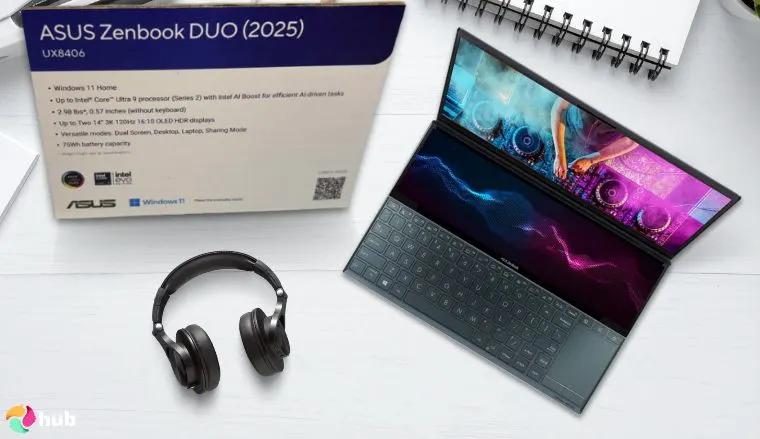
Now, let’s talk about the ASUS Zenbook DUO’s most unique feature, its dual screen. This setup gives the ASUS Zenbook Duo matchless versatility, regardless of whether it’s being used to boost your productivity tasks or creativity. If you need a split screen for sharing or one big screen akin to a great gaming monitor (along with the kickstand) the ASUS Zenbook DUO can handle it with ease.
While the dual setup provides great versatility, it doesn’t sacrifice quality to do so. Each of the ASUS Zenbook DUO’s dual screens is a stunning 3K OLED, granting crystal clear displays for all your needs.
| Pros | Cons |
|---|---|
| ✅ Much stronger than its design may imply ✅ NPU helps boost CPU performance ✅ Lightweight design and tiny profile despite its meaty specs ✅ Dual 16:10 touch displays with 3K OLED ✅ Versatile configuration options for its dual screens – split, shared, or fused together | ❌ More expensive than a single display, though the quality is very much worth it |
Final Verdict: The ASUS Zenbook DUO pairs stunning dual 3K OLED touch displays with exceptional portability and versatility, making it a premium choice for professionals and creatives who want maximum screen space without sacrificing mobility.
5. ASUS Vivobook 17 (X1704) [Best Big Screen]

| Specs | Details |
|---|---|
| CPU | Intel Core i3 |
| GPU | Intel UHD Graphics |
| RAM | 40GB |
| Display | 17.3’’, 1920×1080 |
| Storage | 2.5TB |
| Battery Life | 50Wh |
| Weight | 2.10kgs/4.63lbs |
First off, there are a ton of ASUS Vivobook laptops in existence, so you’ll need to be specific with the model number. In this case, this product appears to be a X1704.
As you can surmise from the specs (and the price), this is hardly a powerhouse laptop. Its CPU is an Intel Core i3-1215U, while its graphics are stuck to an integrated graphics card. 40GB of RAM does help, but gaming-wise, the performance of the X1704 isn’t strong. Note that some models come with an i5 or i7 (same gen) if you want to upgrade.
As long as you’re not going to do anything too crazy with the X1704, like video editing, it offers steady, reliable service, which makes it a great work, study, or general use companion. It’s also a Windows laptop, making it super usable right off the bat.
The deal maker for this laptop is its display. At this price point, it’s tricky to find a really good display. However, this is where the ASUS Vivobook X1704 shines, with its vibrant 17.3’’ FHD screen. This excellent display offers spacious comfort, regardless of whether you plan to use the laptop for everyday tasks or media consumption.
| Pros | Cons |
|---|---|
| ✅ Stunning FHD that’s tricky to get at this price point ✅ Modest performance; good for work, study, or daily use ✅ Large screen size ✅ Not too pricey ✅ Comes with Windows 11 | ❌ GPU severely hampers gaming performance, though it can run games on lower settings |
Final Verdict: The ASUS Vivobook X1704 is a dependable everyday laptop with an impressively vibrant 17.3″ FHD display, making it ideal for work, study, and media consumption despite its limited gaming capabilities.
6. ASUS ProArt PX13 [Best for Designers]
| Specs | Details |
|---|---|
| CPU | AMD Ryzen AI 9 HX 370 Processor 2.0GHz |
| GPU | NVIDIA GeForce RTX 4050 |
| RAM | 32GB |
| Display | 13.3’’, 2880×1800, 60Hz |
| Storage | 1TB, 2TB |
| Battery Life | 73Wh |
| Weight | 1.38kg/3.04lbs |
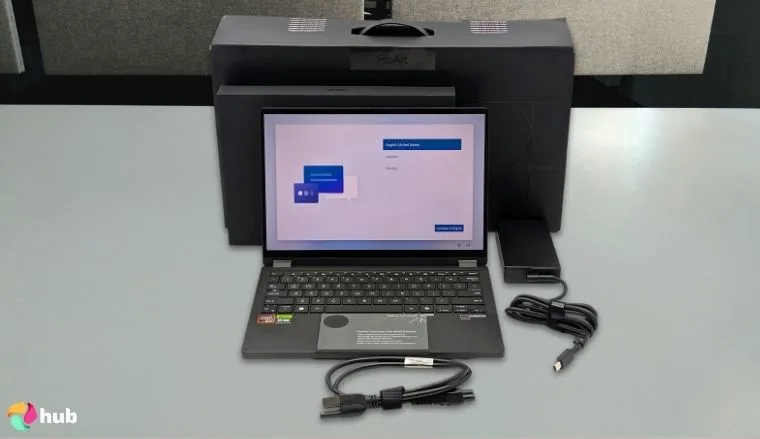
The ASUS ProArt PX13, as its name suggests, is made especially for visual creatives. Does the claim hold water? Yes, it does.
Specs-wise, the ProArt PX13 has a great combination of a Ryzen AI 9 370 and an RTX 4050. 32GB of RAM is a great stopping point, and you can get this laptop in either the 1 or 2TB variants. I’d easily recommend the 2TB one. These specs are strong enough to be a gaming laptop, though that’s a waste of its capabilities.
While the specs are nice, the ProArt PX13 pro-grade performance is just the tip of the iceberg. The real reason why this model is one of the best ASUS laptops for artists is its sheer visual quality. With a color-accurate, 3K OLED touch screen, the ProArt PX13 is perfect for creators who have exacting standards for precision and quality.
As if that wasn’t enough, the ProArt PX13 is also a 2-in-1 convertible laptop, with the ability to switch between different configurations (including laptop, tablet, tent, and stand), which makes it an ideal partner to bring along with you. Couple that with its light yet sturdy frame and military grade durability, and you’ve got a winner.
| Pros | Cons |
|---|---|
| ✅ Robust and durable despite its small size ✅ Visually impressive and responsive 3K OLED display that’s perfect for artists ✅ 2-in-1 convertible form factor allows for this laptop to be used in a variety of ways ✅ Good battery life ✅ Comes with Windows 11 | ❌ 13’’ screen might be a touch too small, though the visual fidelity is hard to beat |
Final Verdict: The ASUS ProArt PX13 stands out as a versatile and durable 2-in-1 laptop, offering exceptional visual accuracy and flexibility that make it a top-tier choice for designers and creative professionals on the go.
7. ASUS ROG Strix G16 (2025) [Best for High Performance]
| Specs | Details |
|---|---|
| CPU | Intel Core i9-12900H |
| GPU | NVIDIA GeForce RTX 3070 Ti |
| RAM | 16GB |
| Display | 16’’, FHD+, 165Hz |
| Storage | 1TB |
| Battery Life | 90Wh |
| Weight | ~2.5kg/5.51lbs |
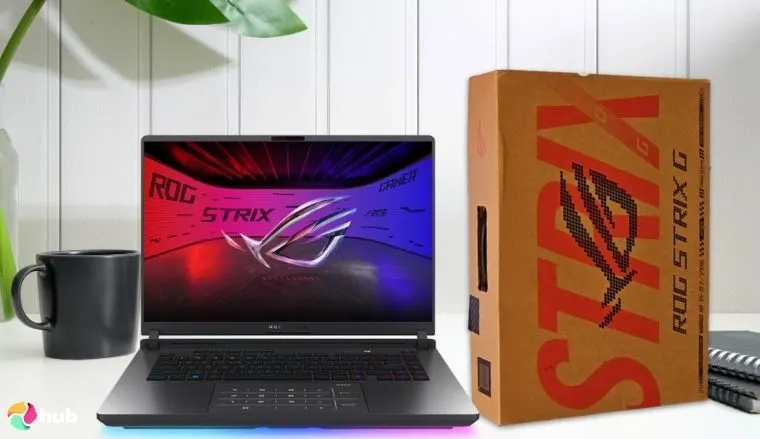
The ROG series has always been at the forefront of ASUS’ gaming laptop catalog, and rather unsurprisingly, many laptops from this series have a strong claim to the title of best ASUS gaming laptop.
While the ROG Strix G16 has been around for some time, it’s seen so much success that all ASUS really had to do was bump up its specs. This Strix G16 comes with an i7 14650HX and an RTX 5060, which allows it to run demanding games with ease. For RAM, it comes with a decent 16GB that can be bumped up with one extra slot. All in all, a very solid gaming laptop.
This is capped off by a high-refresh FHD+ display with a 165Hz refresh rate. What’s the point of having good graphics if you don’t have a good monitor to enjoy them on, after all?
Even if you aren’t using the Strix G16’s specs for accelerated victory in competitive gaming, it’s still a mighty machine well-suited to everyday work. Thanks to the CPU and GPU combination, the Strix G16 can easily handle demanding duties such as video rendering and editing. Handling these intensive tasks requires a laptop with strong processing power and efficient thermal performance, which is why choosing one of the best laptop for rendering can make a big difference.
But while it has a lot of things going for it, perhaps this gaming laptop’s greatest asset is its price. Despite all this power, this is still one of the best gaming laptops under $1500.
| Pros | Cons |
|---|---|
| ✅ Remains a steadfast machine even in 2025 – the upgraded specs help in that regard ✅ Brilliant 165Hz FHD+ display ✅ Advanced cooling systems thanks to ROG architecture ✅ Per-key RGB keyboard ✅ Long battery life | ❌ Quite bulky, but that’s the price you pay for such beefy specs. |
Final Verdict: The ASUS ROG Strix G16 (2025) delivers top-tier gaming and creative performance, making it an unbeatable powerhouse for under $1500 despite its bulkier build.
8. ASUS Vivobook Flip 16 [Best Portable]
| Specs | Details |
|---|---|
| CPU | Intel Core i5-1335U |
| GPU | Intel HD Graphics |
| RAM | 8GB |
| Display | 16’’, 1920×1200 |
| Storage | 1TB |
| Battery Life | 51Wh |
| Weight | 1.90kg/4.19lbs |
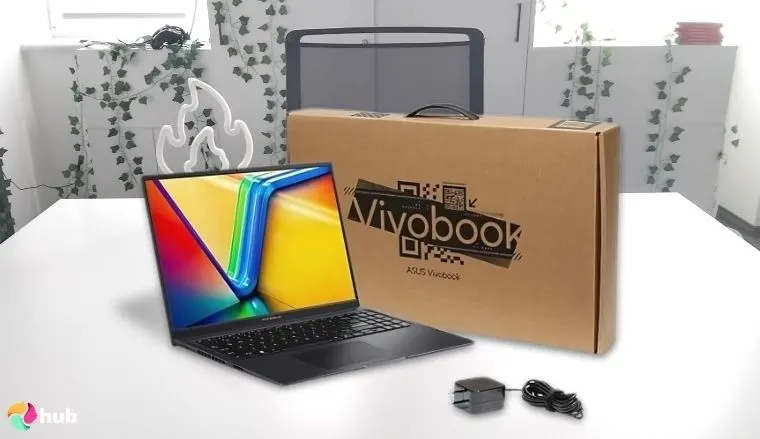
Last, but not least on this list is the ASUS Vivobook Flip 16. While we’ve gone through 3 ASUS Vivobook laptops on this list, the Flip 16 is distinct because of its flip design.
As always, let’s run through the specs. A 13th-gen Intel Core i5 provides decent performance. An integrated graphics card (Intel HD, I believe) offers modest visuals; once again, if you’re gaming, you 100% want a dedicated GPU. Lastly, 1TB of space should be good enough for business and productivity tasks.
The RAM on this device bears special mention: while 8GB should be enough for casual users, keep in mind that there’s only 1 extra SO-DIMM slot on this ASUS Vivobook laptop.
You might’ve already guessed from the name, but the ASUS Vivobook Flip 16 differs from other ASUS Vivobook laptops via its 2-in-1 flip design. Apart from the modest, “just enough” performance of other ASUS models, this particular laptop is sleek, sexy, and incredibly portable, allowing you to work (or play) wherever you please.
| Pros | Cons |
|---|---|
| ✅ Solid performance for a midrange laptop ✅ 2-in-1 flip design and light form factor allow for extreme versatility ✅ Crystal clear and crisp visuals ✅ Long battery life ✅ Comes with Windows 11 | ❌ Single RAM slot minus soldered-on RAM, though 8GB is enough for casual users |
Final Verdict: The ASUS Vivobook Flip 16 combines a sleek 2-in-1 design with solid midrange performance, making it perfect for users who value portability and versatility.
9. ASUS ExpertBook P5 P405 [Best for Business]
| Specs | Details |
|---|---|
| CPU | Intel Core Ultra 5/Intel Core Ultra 7 |
| GPU | Intel Arc Graphics |
| RAM | 16GB |
| Display | 14’’, 2560×1600 |
| Storage | 512GB |
| Battery Life | 63Wh |
| Weight | ~1.27kg/2.80lbs |
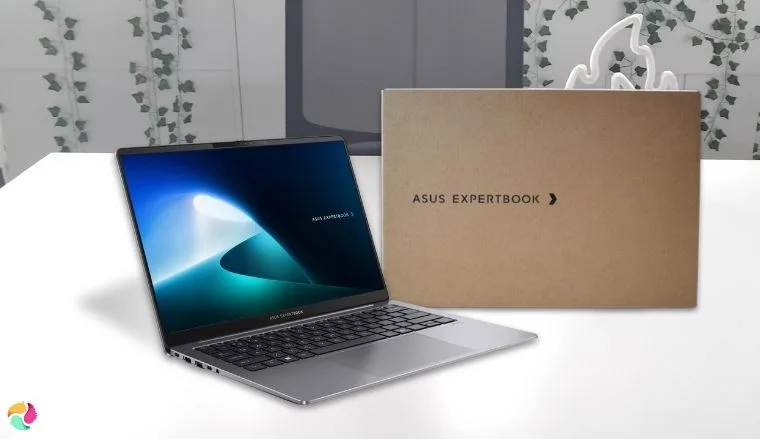
ASUS has a lot of gaming laptops, but this isn’t one of them. The ASUS ExpertBook P5, like the ASUS Zenbook series, is advertised truthfully as a next-era AI business laptop.
Let’s start with the specs. This laptop features a beefy Intel Core Ultra or Intel Core Ultra 7, depending on which version you decide to run with; either way, it’s a solid choice for CPU. Said CPU is Copilot+ ready, with ASUS claiming that it “delivers up to a 3x AI performance and up to 120 platform TOPS”.
It’s hard to put into words just how fast this CPU is, but believe me, it’s FAST. It’s a Windows laptop, too, which minimizes setup and allows you to dive right into your productivity tasks. Lastly, it’ll be compatible with a lot of your devices, with two USB C ports (Thunderbolt 4), a USB A port (3.2), an HDMI port (2.1), and a hybrid headphone jack.
Do note that this is a business laptop. As such, it doesn’t have a strong GPU or particularly strong RAM. It *will* game if you make it, but don’t expect stellar results. It’s really for daily work.
| Pros | Cons |
|---|---|
| ✅ Good CPU ✅ NPU helps maximize performance ✅ Military grade toughness despite a small form factor ✅ Not too pricey ✅ Come with Windows 11 | ❌ Purely a work computer thanks to its integrated GPU and lower RAM, though you can game on lower settings |
Final Verdict: The ASUS ExpertBook P5 P405 delivers exceptional business performance, making it a top choice for professionals who prioritize speed, portability, and productivity over gaming.
Prominent Features of ASUS Laptops
If you aren’t sold yet on getting an ASUS laptop, here are 5 standout features that this brand has.
1. Leadership in OLED Displays
When it comes to premium laptops with OLED displays, ASUS laptops are hard to beat. OLED and mini-LED displays are always there among the various laptop lines that ASUS has, and no matter which model of laptop you get, you’re almost guaranteed to have a dazzling visual experience.
For gamers, the ROG Strix series has the amazing Nebula HDR mini-LED setup. More modern versions of the Zenbook line boast a 14-inch, 2880×1440 (3k) resolution, while the Vivobook series has been experimenting with the similarly beautiful Lumina OLED display. Do note that better displays (especially bright colors) take a toll on battery life.
Artists, in particular, will love the high visual fidelity offered by the ProArt series. These laptops feature cutting-edge 4k HDR screens, which help ensure that everything is pixel-perfect. This makes ASUS laptops the ideal companion for playing the best PC games.
2. Pioneering Dual-Screen and Innovative Form Factors
Unlike PCs, laptops can be taken on the go. Thus, form factor is a very important element when purchasing a laptop.
While there are big ASUS laptops like the ROG series (strong computers need lots of space for their parts) ASUS hasn’t given up on reducing their size. Thanks to innovations in materials and better miniaturization, we now have strong laptops like the Zenbook DUO that, while plenty powerful, have a thin and light form factor of just 0.57’’.
This compactness has also led to the refinement of previously unwieldy designs. The best example of this is (once again) the Zenbook DUO, which is not only super thin but also has a dual-screen setup. It may not have been the first dual-screen laptop, but it’s an amazing piece of tech.
Lastly, I have to point out that ASUS laptops with dual screens tend to be on the pricier side, so if you need the extra monitors, it might be a good idea to check out some of the best ASUS monitors too.
3. Cutting-Edge Cooling Solutions
Good laptops require robust cooling solutions, and ASUS recognizes this. Each of their laptops comes with fantastic cooling solutions that greatly dissipate heat, and nowhere is this more evident than in the ROG series.
The ROG series features better, newer designs of existing cooling tech. Arc flow fans leverage blades with different thicknesses to maximize airflow efficiency, while vapor chambers iterate upon the existing heatsink-heatpipe design to both facilitate the vaporization process and allow it to reach more parts of your laptop.
Lastly, ASUS has been experimenting with liquid metal instead of traditional thermal paste as a cooling solution. While this does present some challenges (in that liquid metal is still electrically conductive), the higher temperature range of these substances allows for better cooling.
4. Robust and Distinctive Build Materials
No laptop is safe from bumps and falls, and ASUS takes measures to ensure that its laptops are tough.
While ASUS uses the traditional aluminum and strong plastic construction for its laptops, they’ve also been constantly looking for new materials to work with. This effort has paid off with their new Ceraluminum™, an aluminum-ceramic composite. While this compound isn’t new, it made a strong first impression, with it being used for the chassis of the Zenbook S16.
If that isn’t enough, you’ll be happy to know that ASUS laptops are also certified MIL-STD 810H. This certification means that these laptops pass the US military tests and have undergone multiple test methods and procedures.
5. AI Integration and Copilot+ PC Readiness
It’s only a matter of time before we all have an AI-powered computer. ASUS knows this, and they’ve been working double time to make their laptops AI-ready.
The biggest game changer is going to be the emergence of Copilot+ PCs, which aim to integrate an AI to streamline tasks and improve performance. To this end, some ASUS laptops incorporate AI ready processors, such as the Snapdragon X Plus or Snapdragon X Elite.
While we aren’t *yet* at full Copilot+ PCs, modern ASUS models (usually Windows laptops) already do use AI to some extent. Some models, like the Asus Zenbook DUO, already use NPUs to boost their capabilities.
FAQs
What is the best ASUS laptop?
The best ASUS laptop on this list is the Vivobook S14 due to its good price and all-around power. If, however, you’re looking for more specialized art or gaming laptops, it’s wise to check out ASUS’ other product lines.
Is ASUS a good laptop?
Yes, ASUS is a good laptop. However, as with every product, it pays to do research on the model you’re planning to buy.
Which series of ASUS is best?
There’s no one best ASUS laptop series as they’re all tailored to fit specific niches. The ROG series is made for high-end gaming, the ProArt for artists and designers, and so on.
What’s the best ASUS ROG laptop?
The best ASUS laptop is the ROG Strix Scar 18, due to its updated CPU and GPU. However, other ROG models are also worth a look, especially if you’re shopping on a budget.
Which ASUS laptop is best for everyday use?
The best ASUS laptop for everyday use depends on what your needs are. However, if we’re talking about daily tasks, a mid-range laptop will probably be best. If, however, you’re looking for something stronger, the ASUS Zenbook DUO or any ASUS VivoBook laptop is a good place to start.